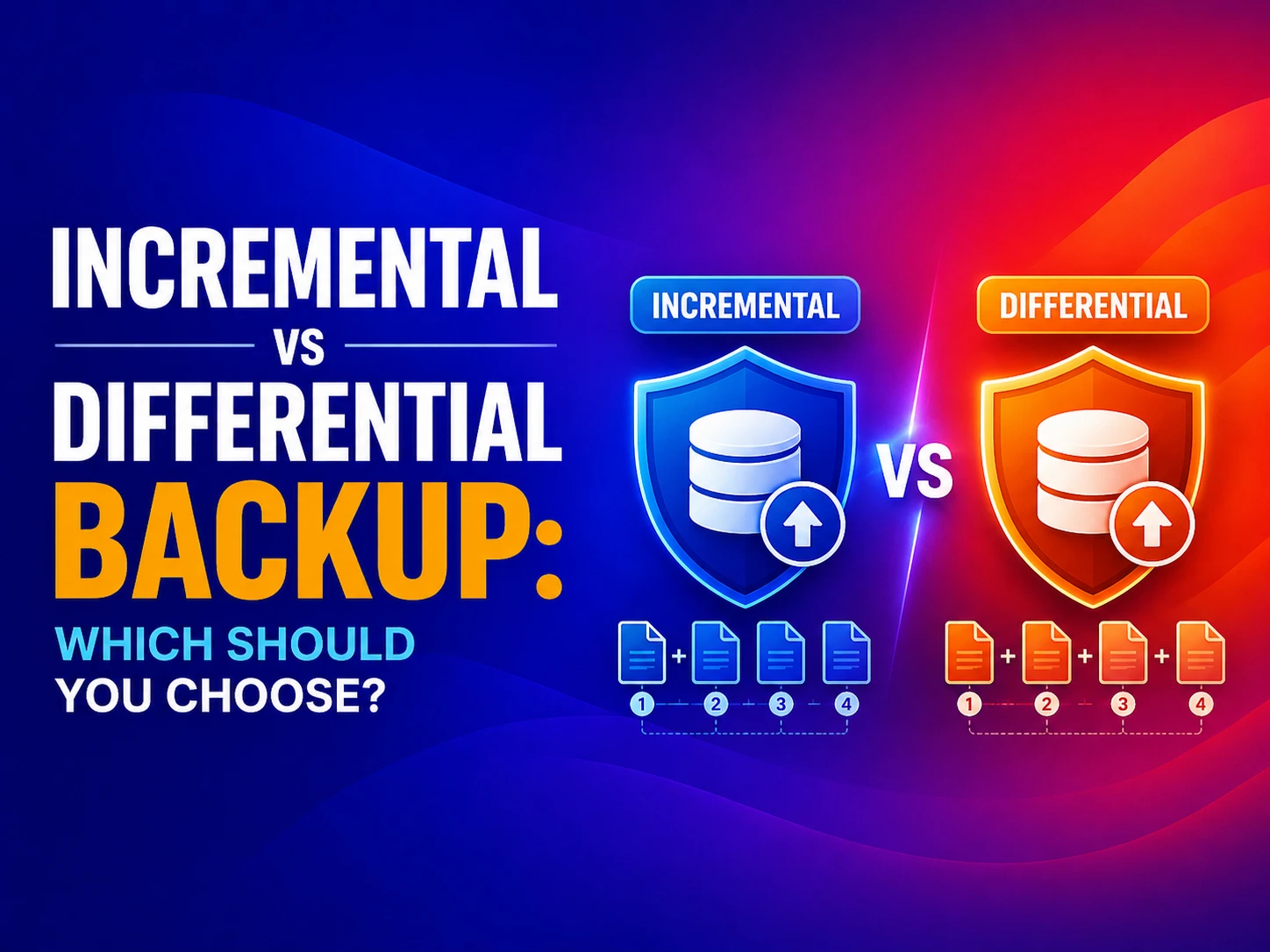
⚡ Quick Answer: Incremental vs Differential Backup An incremental backup saves only the data changed since the last backup of any type (full or incremental). It is fast to create and uses minimal storage, but requires every backup in the chain to restore. A differential backup saves all data changed since the last full backup. It takes more storage and time to create, but restoration requires only two files – the last full backup and the latest differential – making it faster and simpler to recover. The key trade-off: incremental backups are faster to create; differential backups are faster to restore. |
✍️ About This Guide Written by the backup and disaster recovery team at CodeHyper, a Sydney-based managed IT and cybersecurity provider. Our team designs and implements backup strategies for Australian businesses across Microsoft 365, Azure, and on-premises environments using platforms including Datto SIRIS, Veeam, and Azure Backup. This guide reflects backup architecture principles aligned with the ASD Essential Eight (Control 8: Regular Backups) and the ACSC’s guidance on business continuity for Australian organisations. |
Most conversations about backup strategy focus on the wrong question. They compare backup speed and storage efficiency – as if the goal of backup is to efficiently create backup files. It isn’t. The goal of backup is recovery. Fast, reliable, complete recovery after a ransomware attack, hardware failure, accidental deletion, or natural disaster. Every backup decision should be evaluated through that lens first.
The choice between incremental and differential backup directly determines how long your business is offline after an incident. In 2026, with the average Australian ransomware recovery taking between 2 and 21 days depending on backup strategy maturity, that decision has a direct dollar value. A backup architecture that saves 10GB of storage per week but adds 6 hours to your recovery time is not a good trade.
This guide gives you what most comparisons don’t: a complete picture of both how these backup types work and what they mean in practice – for RTO, for RPO, for ransomware resilience, for Microsoft 365 environments, and for Australian compliance requirements under the ASD Essential Eight and the Privacy Act. Whether you are choosing a backup strategy for the first time or reviewing an existing one, this is your complete reference.
For immediate backup assessment or implementation support, see our cloud backup strategy guide, our Microsoft 365 backup overview, or our disaster recovery plan checklist.
The Foundation: Understanding Full, Incremental, and Differential Backup
Before comparing incremental and differential backups, it is essential to understand that neither can exist without a full backup as the foundation. All three types work together in a backup strategy – they are not alternatives to each other but components of a layered approach.
Full Backup
What it does: Copies the entire data set – every file, every folder, every database record – regardless of whether anything has changed since the last backup.
When it runs: Typically weekly or monthly. Rarely daily due to the time, bandwidth, and storage cost involved.
Recovery: Fastest and simplest – a single backup set contains everything needed to restore.
The limitation: A business backing up 2TB of data daily via full backup consumes 14TB per week and requires many hours of backup window. For most organisations, daily full backups are operationally impractical. This is why incremental and differential backups exist – to protect data between full backups efficiently.
Incremental Backup
What it does: Captures only the data that has changed since the last backup of any type – whether that was a full backup or the previous incremental backup.
Recovery requires: The last full backup PLUS every incremental backup taken since that full backup, applied in sequence.
The trade-off: Smallest individual backup size and fastest to create. Most complex to restore – the chain must be complete and applied in the correct order.
Differential Backup
What it does: Captures all data that has changed since the last full backup – regardless of how many differentials have been taken since.
Recovery requires: The last full backup PLUS the most recent differential backup only. That is it – two files.
The trade-off: Grows larger over time as it accumulates all changes since the full backup. Slower to create as the week progresses. Significantly faster and simpler to restore than incremental.
The 7-Day Backup Chain: A Visual Worked Example
This is the section most backup comparison articles skip – and it is the most important one. Understanding exactly what data is captured on each day for both strategies makes the restoration implications immediately clear. In this example, a business runs a full backup every Sunday. New or modified data appears on each subsequent weekday.
Incremental Backup – What Gets Captured Each Day
Day | Data Backed Up in Incremental Strategy |
Sunday | Full backup – entire data set (e.g. 500GB). This is the baseline for the week |
Monday | Only Monday’s changes since Sunday’s full backup (e.g. 2GB of new/modified files) |
Tuesday | Only Tuesday’s changes since Monday’s incremental (e.g. 1.5GB) |
Wednesday | Only Wednesday’s changes since Tuesday’s incremental (e.g. 3GB) |
Thursday | Only Thursday’s changes since Wednesday’s incremental (e.g. 1GB) |
Friday | Only Friday’s changes since Thursday’s incremental (e.g. 4GB) |
Saturday | Only Saturday’s changes since Friday’s incremental (e.g. 0.5GB) |
To restore to Saturday state: | Sunday Full (500GB) + Mon (2GB) + Tue (1.5GB) + Wed (3GB) + Thu (1GB) + Fri (4GB) + Sat (0.5GB) = 7 files, applied in sequence |
Differential Backup – What Gets Captured Each Day
Day | Data Backed Up in Differential Strategy | |
Sunday | Full backup – entire data set (500GB). This is the baseline for the week | |
Monday | All changes since Sunday’s full – Monday’s 2GB of changes (same as incremental on Day 1) | |
Tuesday | All changes since Sunday’s full – Monday’s 2GB + Tuesday’s 1.5GB = 3.5GB cumulative | |
Wednesday | All changes since Sunday’s full – Mon + Tue + Wed changes = 6.5GB cumulative | |
Thursday | All changes since Sunday’s full – Mon through Thu changes = 7.5GB cumulative | |
Friday | All changes since Sunday’s full – Mon through Fri changes = 11.5GB cumulative | |
Saturday | All changes since Sunday’s full – all week’s changes = 12GB cumulative | |
To restore to Saturday state: | Sunday Full (500GB) + Saturday Differential (12GB) = 2 files only | |
�� The Key Insight From This Example By Saturday, restoring via incremental requires assembling 7 separate files in exact sequence. Restoring via differential requires only 2 files. If any one of those 7 incremental files is corrupted, missing, or applied out of order, the restore fails. The differential restore has only one potential failure point: the Saturday differential itself. This is why differential backup is faster and more reliable to restore – at the cost of growing storage consumption across the week. | ||
RTO and RPO: The Two Metrics That Actually Define the Right Backup Strategy
Most backup comparisons discuss recovery speed in vague terms – ‘differential is faster to restore’. But the metric that matters for business decision-making is specific: how long will your business be offline? That question is answered by two formal metrics that every backup strategy must be designed around.
Recovery Time Objective (RTO)
Definition: The maximum acceptable time between a failure occurring and normal business operations being restored. If your business can tolerate being offline for 4 hours before significant financial or operational damage occurs, your RTO is 4 hours.
How backup type affects RTO: Differential backup almost always delivers a lower RTO than incremental backup for the same data set, because it requires fewer files to locate, verify, and apply during restoration. The more days since the last full backup, the greater this difference becomes.
Practical RTO estimates for a 500GB data set with weekly full backup:
Days Since Last Full Backup | Estimated Incremental Restore Time |
1 day (Monday) | ~45 minutes (full + 1 incremental) |
3 days (Wednesday) | ~90 minutes (full + 3 incrementals) |
5 days (Friday) | ~150 minutes (full + 5 incrementals) |
6 days (Saturday) | ~180 minutes (full + 6 incrementals) |
Recovery Point Objective (RPO)
Definition: The maximum acceptable amount of data loss measured in time. If your business runs hourly incremental backups, your RPO is approximately 1 hour – you could lose up to 1 hour of data in a worst-case failure. If you run daily differentials, your RPO is 24 hours.
How backup type affects RPO: Incremental backup is inherently better for RPO because incremental backups can be run more frequently – every 15 minutes if needed – without the storage penalty that would make 15-minute differential backups impractical. Frequent incrementals mean less data loss in a failure scenario.
�� The RTO vs RPO Trade-Off Summarised Incremental backup: Lower RPO (less data loss) because backups can run frequently. Higher RTO (longer recovery time) because more files must be restored in sequence. Differential backup: Higher RPO (more data loss possible) because storage constraints limit backup frequency. Lower RTO (faster recovery) because only two files are needed. Choose based on your business priority: if losing minimal data matters most, lean incremental. If getting back online fastest matters most, lean differential. |
Incremental vs Differential Backup: Complete Head-to-Head Comparison
Factor | Incremental Backup | Differential Backup | Winner |
Backup speed (creation) | Fastest – only changes since last backup of any type | Moderate – grows as week progresses; captures more data each day | Incremental ✅ |
Storage efficiency | Most efficient – smallest cumulative storage footprint | Less efficient – each differential grows until next full backup | Incremental ✅ |
Restore speed (RTO) | Slowest – requires full backup + every incremental in sequence | Fastest – requires only full backup + latest differential | Differential ✅ |
Restore complexity | High – file chain order matters; one corrupted file breaks the restore | Low – two files only; independent of previous differentials | Differential ✅ |
Data loss risk (RPO) | Lower – can run very frequently without storage penalty | Higher – storage growth limits how frequently you can run them | Incremental ✅ |
Resilience to single backup failure | Lower – one missing or corrupt incremental breaks the chain | Higher – only the latest differential and the full backup matter | Differential ✅ |
Ransomware recovery reliability | Higher risk – attackers who delete backup files can break the incremental chain | Lower risk – fewer files to protect/isolate for a complete restore | Differential ✅ |
Network bandwidth during backup | Minimal – small, frequent transfers | Grows over time – larger files toward end of backup cycle | Incremental ✅ |
Software compatibility | All modern backup platforms support it | All modern backup platforms support it | Tie |
Best for Microsoft 365 / SaaS data | Yes – SaaS data changes constantly; frequent incrementals suit high-change environments | Yes – for organisations prioritising fast restore over minimal storage | Context dependent |
Best for compliance documentation | Provides granular point-in-time recovery – every hour, every 15 minutes | Simpler chain is easier to audit and document for compliance purposes | Context dependent |
Ideal environment | High-change data, tight backup windows, frequent RPO requirements | Business-critical systems where recovery speed is non-negotiable | Context dependent |
Backup Strategy and Ransomware: The Gap Every Australian Business Must Close
Ransomware is now the primary reason Australian businesses need reliable backup – and it introduces backup strategy considerations that pure storage-and-speed comparisons completely miss. In a ransomware incident, the attacker’s standard playbook involves targeting backup infrastructure first – deleting shadow copies, destroying backup agents, and encrypting backup repositories before triggering the ransom encryption. Your backup strategy must be designed with this threat model in mind, not just hardware failure.
How Ransomware Exploits Incremental Backup Chains
Incremental backup chains have a specific vulnerability under ransomware attack: the chain dependency. If an attacker deletes, encrypts, or corrupts even one incremental backup file in the chain, every incremental that follows it becomes unrestorable. A ransomware payload that targets your backup repository and destroys incrementals from Wednesday through Saturday leaves you able to restore only to Tuesday – even if backups ran successfully every day.
This is not a theoretical risk. It is the documented approach used by ransomware groups including LockBit and BlackCat against organisations with agent-accessible backup infrastructure. The ASD Essential Eight Control 8 explicitly requires backups to be isolated, immutable, and tested – a direct response to this attack pattern.
How Ransomware Affects Differential Backup
Differential backups are slightly more resilient under ransomware attack because each differential is independent of previous differentials. A ransomware attack that destroys Monday through Friday’s differentials still leaves a complete restore possible from the last full backup alone – losing a week of data is painful, but the business can recover. An attack that destroys the full backup and all differentials requires the same response as destroying an incremental chain – nothing to recover from.
What Actually Protects Your Backup Against Ransomware
The backup type – incremental or differential – matters less than these three non-negotiable architectural controls:
- Immutability: backups stored in immutable storage (Azure Immutable Blob, Datto ransomware protection) cannot be encrypted or deleted – even by admin credentials. This is the most important ransomware backup control regardless of backup type
- Isolation: backup systems must be on isolated networks, inaccessible from user workstations or the primary server environment. A ransomware payload executing on a file server should have no network path to the backup repository
- Tested restoration: an untested backup is not a backup – it is an assumption. Quarterly restoration tests are the only way to verify that your backup chain or differential files are intact and restorable. This is a specific requirement under ASD Essential Eight Control 8
Our cloud backup strategy guide covers these three controls in detail, including specific Azure and Datto configurations that satisfy ASD Essential Eight Control 8 requirements.
Beyond Incremental and Differential: Synthetic Full and Incremental-Forever Backup
Modern backup platforms have largely addressed the core weakness of incremental backup – the long restore chain – through two approaches that are rapidly displacing traditional backup scheduling in professional environments. Understanding these is essential for any business building or reviewing its backup strategy in 2026.
Synthetic Full Backup
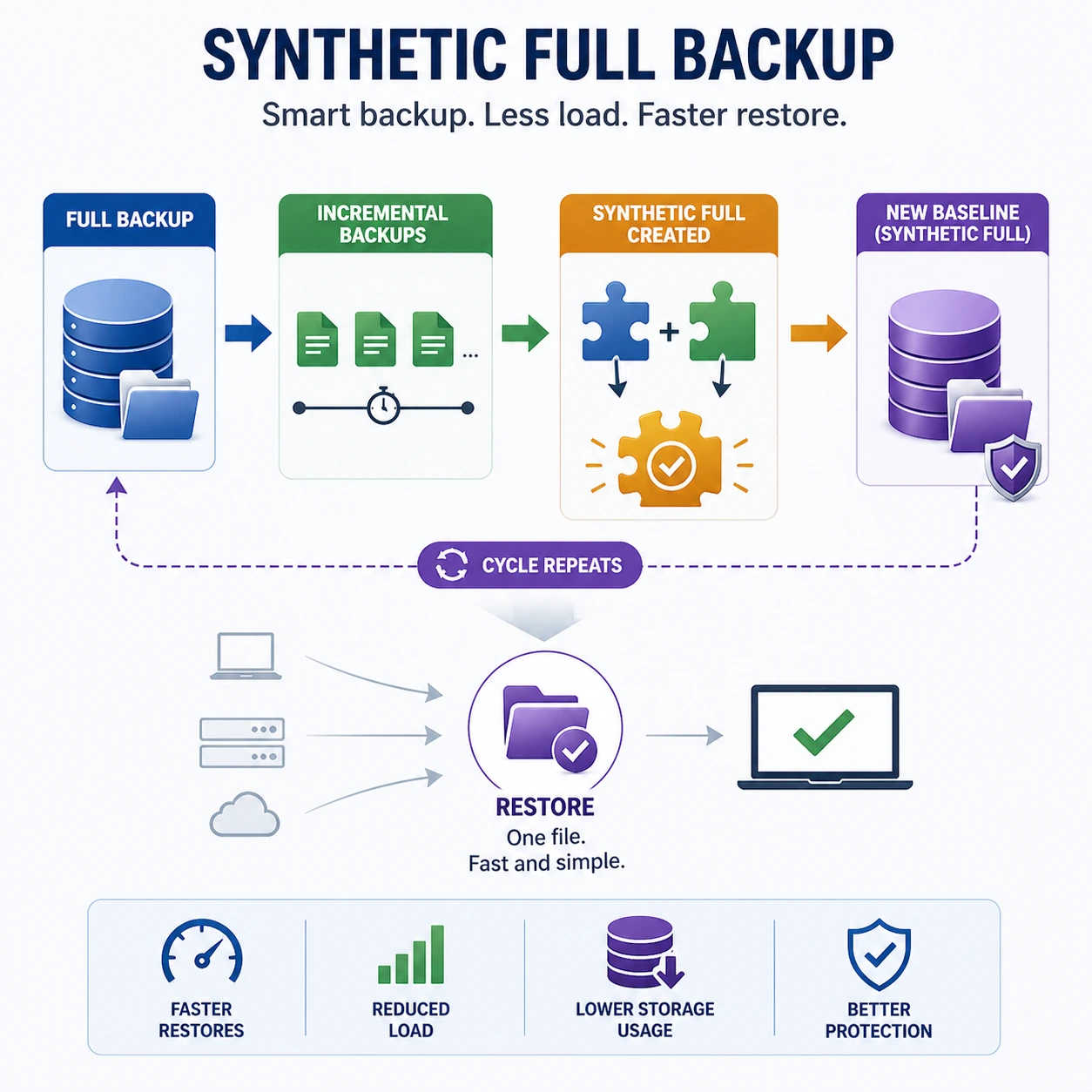
A synthetic full backup combines an existing full backup with subsequent incrementals to create a new full backup – without requiring a fresh full backup to be taken from the source data. The new ‘synthetic full’ then serves as the baseline for the next round of incrementals.
The benefit: you get the simplicity and speed of a full backup for restoration purposes, without the network and performance impact of running an actual full backup against live systems. Restoration requires only one file – the synthetic full.
When to use: organisations with large data sets where weekly full backups create unacceptable network or performance load, but who still want simple, single-file restoration.
Incremental-Forever (Forward-Incremental) Backup
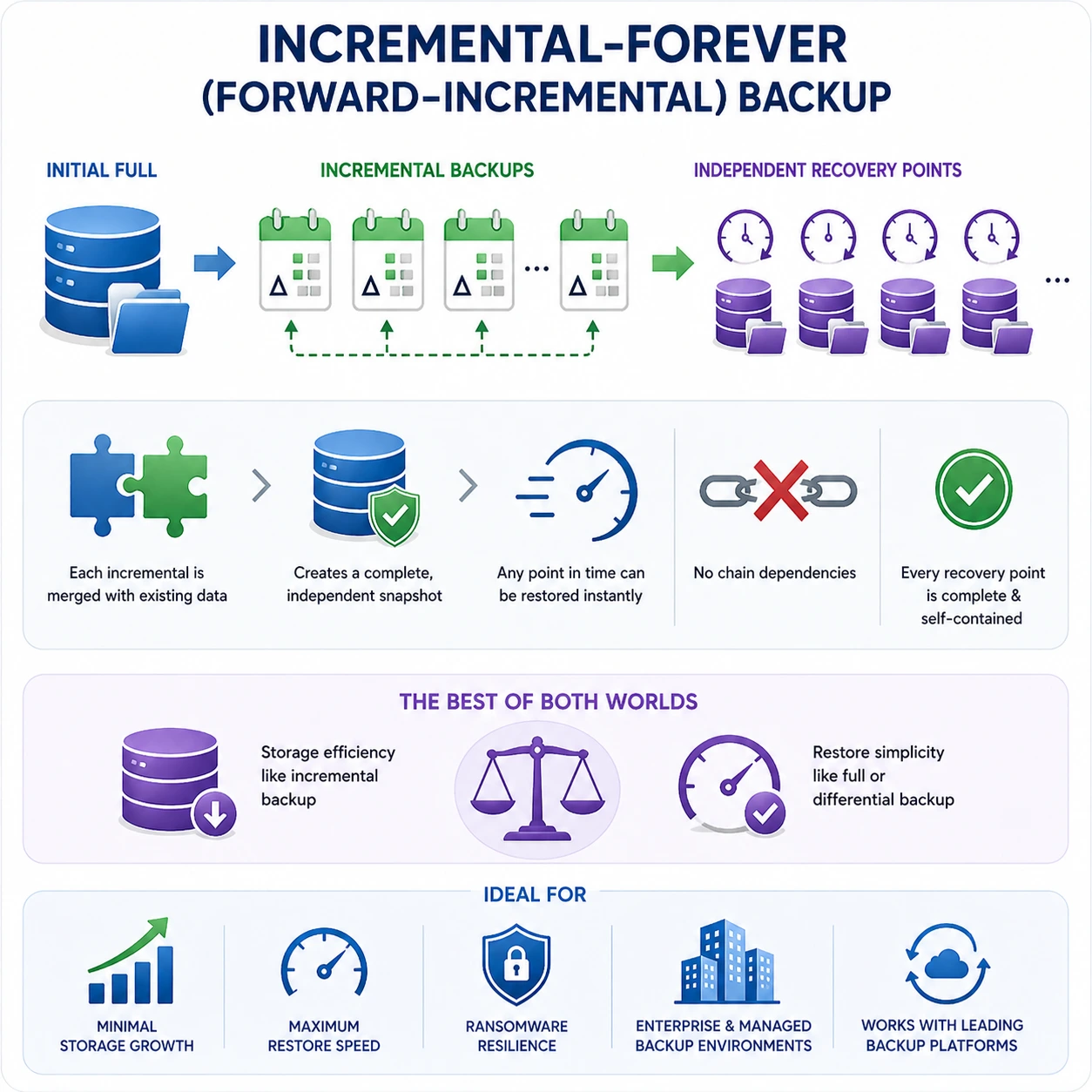
Incremental-forever – also called forward-incremental or Datto’s Inverse Chain Technology – takes an initial full backup and then only ever takes incremental backups thereafter. The key innovation is how the backup software constructs recovery points: rather than restoring by applying incrementals sequentially, each incremental is mathematically merged with the preceding data to create a self-contained, instantly recoverable snapshot.
The result: incremental-forever backup delivers the storage efficiency of incremental backup with the restore simplicity of differential or full backup. Each recovery point is complete and independent – no chain dependencies, no risk of a broken chain. This is the approach used by Datto SIRIS (Inverse Chain Technology) and Veeam (Forward Incremental with synthetic fulls), and it is increasingly the standard for professional managed backup deployments.
When to use: organisations wanting the best of both worlds – minimal storage growth, maximum restore speed, and ransomware resilience. Requires a backup platform that supports this architecture (Datto, Veeam, Zerto, or Azure Backup with Instant Restore).
Backup Type | Backup Speed |
Full Only | Slowest |
Full + Incremental (traditional) | Fastest |
Full + Differential | Moderate |
Synthetic Full | Fast (no source load) |
Incremental-Forever (Datto/Veeam) | Fastest |
Applying Backup Strategy to Microsoft 365 and Azure Environments
Most backup comparisons discuss backup strategy in terms of on-premises file servers and databases. But for the majority of Australian businesses in 2026, the most business-critical data lives in Microsoft 365 – Exchange Online, SharePoint, OneDrive, and Teams – and in Azure. Understanding how incremental and differential backup applies to these environments is not optional; it is where the rubber meets the road.
Microsoft 365: What Microsoft Backs Up (and What It Doesn’t)
Microsoft operates under a shared responsibility model for Microsoft 365. Microsoft is responsible for the platform’s availability and infrastructure. You are responsible for your data. Microsoft’s native retention policies – Recycle Bin, version history, and litigation hold – are not a backup. They do not protect against ransomware encryption via compromised accounts, deliberate deletion by a malicious insider, or retention gaps in licensing tiers.
Third-party Microsoft 365 backup solutions – including Datto SaaS Protection and Veeam Backup for Microsoft 365 – use incremental backup approaches to capture changes to Exchange, SharePoint, OneDrive, and Teams data at defined intervals. For most platforms, this means incremental backup every 24 hours or more frequently for Exchange, creating a point-in-time recovery chain. Our Microsoft 365 backup guide covers the specific solutions and what they protect.
Azure VM Backup: Incremental Snapshots
Azure Backup for virtual machines uses incremental snapshots – capturing only the disk blocks that have changed since the previous snapshot, regardless of the block content. Azure’s Instant Restore capability turns each incremental snapshot into a self-contained recovery point (similar to incremental-forever architecture), delivering fast restore times without needing to reconstruct the full chain. For Azure VMs, this is the recommended approach – providing frequent recovery points with minimal storage cost and fast RTO.
On-Premises Servers in Hybrid Environments
For businesses running a hybrid cloud environment with some workloads on-premises and some in Azure, backup strategy must be coordinated across both environments. A common approach: daily incrementals with weekly full backups for on-premises file servers and domain controllers, with on-premises backup replicated to Azure Blob Storage for off-site protection. Azure-hosted VMs use Azure Backup’s incremental snapshot approach. Microsoft 365 data uses a dedicated SaaS backup platform. The 3-2-1 backup rule – three copies, on two different media, one off-site – applies equally across all three environments.
ASD Essential Eight Control 8 and What It Requires From Your Backup Strategy
The ASD Essential Eight‘s Control 8 (Regular Backups) is the most directly applicable Australian cybersecurity framework for backup strategy – and it makes specific requirements that go beyond simply choosing between incremental and differential backup.
Essential Eight Control 8 Requirement | What It Means for Your Backup Type Choice |
Backups of important data, software, and configuration settings performed and retained | Both incremental and differential satisfy this – the key is ensuring all critical data is in scope, not just file systems. Databases, Microsoft 365 data, and system configurations must all be included |
Backups stored disconnected from the source system (offline or offsite) | Applies to both backup types – the storage location matters, not the backup method. A differential backup stored on the same server it backs up satisfies no security requirement |
Tested restoration regularly to verify recovery capability | Critical for incremental backup chains – one broken link makes the chain unrestorable. Quarterly restoration tests are the minimum. For incremental-forever platforms, test recovery point integrity rather than chain completeness |
Backups protected from modification and deletion | Immutable storage is required at ML2 and above. Azure Immutable Blob, Datto ransomware protection, or air-gapped storage. Applies to both incremental and differential backups |
Retention period for backups appropriate to the organisation’s needs | For incremental backup, this means retaining the complete chain – every incremental from the last full backup. A partial chain is not a complete backup set |
For businesses pursuing Essential Eight Maturity Level 2 – the recommended baseline for Australian businesses with sensitive data – all five requirements above must be demonstrably met. The choice of incremental versus differential backup is secondary to whether your backups are isolated, immutable, tested, and complete. Our Essential Eight checklist maps Control 8 requirements to specific backup configuration actions.
Case Study: How a Backup Strategy Review Saved an Adelaide Manufacturer $240,000 in Ransomware Recovery Costs
Case Study Snapshot Industry: Manufacturing & Engineering | Location: Adelaide, SA | Staff: 55 | Previous Strategy: Traditional full + incremental (on-premises Backup Exec) | Incident: Ransomware attack targeting backup agent | Previous RTO Estimate: 18–24 hours | Post-Incident Revised Strategy: Datto SIRIS (incremental-forever) + Azure immutable offsite replication | Actual RTO After Strategy Change: 2.1 hours | Estimated Recovery Cost Avoided: $240,000 |
The Original Backup Configuration
Before engaging CodeHyper, the 55-person Adelaide engineering and manufacturing business ran a traditional backup configuration: weekly full backups on Sunday evening, daily incremental backups Monday through Saturday, stored on a Network Attached Storage (NAS) device in the server room. The backup agent ran on the same network segment as the production servers. There was no offsite replication and backups had not been restoration-tested in over 14 months.
The Ransomware Incident
A ransomware attack – delivered via a phishing email that compromised a server admin account – encrypted production servers and targeted the backup NAS directly. The ransomware agent, having obtained domain admin credentials, connected to the NAS using legitimate admin access, deleted all backup files from the past 18 days, and then encrypted the remaining older backup sets. The most recent restorable full backup was 19 days old
The business faced a choice: pay the ransom (demand: $180,000 AUD) or restore from a 19-day-old full backup – losing three weeks of production orders, customer correspondence, engineering drawings, and procurement records. The actual recovery from the 19-day-old backup took 31 hours due to the age of the backup set and the volume of data that needed to be re-entered manually. Total business cost: approximately $240,000 in lost productivity, recovery time, and data re-entry labour.
The Revised Backup Strategy
CodeHyper replaced the existing backup architecture with three key changes:
- Datto SIRIS with Inverse Chain Technology (incremental-forever): every incremental snapshot creates a self-contained, independently restorable recovery point. No chain dependencies. The Datto agent is isolated on a dedicated management VLAN inaccessible from user workstations or domain admin credentials
- Immutable offsite replication to Azure: every recovery point is replicated to Azure Blob Storage with immutability configured – a 30-day retention period during which no recovery point can be modified or deleted, even with Azure admin credentials
- Documented quarterly restoration tests: a formal restoration test procedure is conducted quarterly – recovering a test VM from the previous week’s recovery points and documenting the RTO achieved. Results are logged for ASD Essential Eight Control 8 evidence
The Outcomes – Validated in a Subsequent Incident
Eight months after the strategy change, the business suffered a second ransomware attempt. This time, the attacker encrypted three workstations but could not reach the Datto SIRIS device (isolated VLAN, no accessible credentials) and could not touch the Azure immutable storage. The EDR system isolated the affected workstations within 11 minutes of the attack commencing.
Recovery of the three affected workstations from Datto recovery points took 2.1 hours – compared to the 31 hours required in the previous incident. The business lost less than 20 minutes of data (RPO). The ransom demand was ignored.
“After the first attack, we thought we had backups. We did – just bad ones. After CodeHyper redesigned everything, the second attack didn’t even become a story. We were back up in two hours and the attackers got nothing. The difference was architecture, not luck.” – IT Manager, Adelaide Manufacturing & Engineering Business
Which Backup Strategy Should Your Business Choose?
The choice between incremental and differential backup – or a modern incremental-forever approach – depends on your specific operational requirements. Use this framework to make the right decision for your environment:
Business Situation | Recommended Strategy |
Recovery speed is your #1 priority – cannot afford more than 1–2 hours offline | Differential backup (or incremental-forever/synthetic full for best of both worlds) |
Storage costs are the primary constraint – budget is tight | Incremental backup – lowest storage footprint over time |
Data changes very frequently (e-commerce, financial transactions, medical records) | Incremental backup with short backup intervals – minimise RPO |
Running Microsoft 365 and need SaaS data protection | Third-party SaaS backup using incremental approach (Datto SaaS Protection, Veeam for M365) |
Running Azure VMs | Azure Backup using incremental snapshots with Instant Restore – managed automatically |
ASD Essential Eight compliance is required | Incremental-forever platform (Datto/Veeam) with immutable offsite storage – satisfies all Control 8 requirements most completely |
Ransomware is a primary concern (it should be for every business) | Incremental-forever with immutable offsite replication – most ransomware-resilient architecture regardless of backup type |
Simple IT environment, small data set, limited IT resources | Full + differential – simpler to manage, fewer files to track, faster and simpler restoration |
Hybrid environment (on-premises + Azure + Microsoft 365) | Layered approach: Azure Backup for VMs, Datto/Veeam incremental-forever for on-premises, dedicated SaaS backup for Microsoft 365 |
The Right Backup Strategy Is the One That Actually Recovers When You Need It
Incremental and differential backup are tools – neither is inherently better. The right choice depends on your RTO requirements, your RPO tolerance, your data volumes, your ransomware risk exposure, and your compliance obligations. For most Australian businesses in 2026, the answer is increasingly a modern incremental-forever platform that eliminates the trade-off between backup speed and restore simplicity entirely.
What matters more than the backup type is whether your backups are isolated, immutable, tested, and complete – the four properties that determine whether a backup actually saves your business or simply provides the illusion of protection. The Adelaide case study above illustrates the cost of the illusion.
At CodeHyper, we design and implement backup architectures for Australian businesses that meet both operational requirements and ASD Essential Eight Control 8 compliance – using Datto SIRIS, Veeam, Azure Backup, and Microsoft 365 backup platforms configured to industry best practice. Our managed cybersecurity services include backup monitoring and quarterly restoration testing as standard.
Review our cloud backup strategy guide, our disaster recovery plan checklist, or contact us today for a backup assessment tailored to your environment.
Frequently Asked Questions: Incremental vs Differential Backup
What is the difference between incremental and differential backup?
An incremental backup saves only the data that changed since the last backup of any type – whether that was a full backup or a previous incremental. A differential backup saves all data that has changed since the last full backup, regardless of how many differentials have been taken in between. Incrementals are smaller and faster to create; differentials are simpler and faster to restore.
Which backup type is faster to restore?
Differential backup is faster to restore in almost all scenarios. It requires only two files: the last full backup and the most recent differential. Incremental backup requires the last full backup plus every incremental taken since – the more days since the last full backup, the more files must be assembled in sequence and the longer restoration takes.
What is RTO and RPO in backup strategy?
RTO (Recovery Time Objective) is the maximum acceptable time between a failure and the restoration of normal operations – how long your business can afford to be offline. RPO (Recovery Point Objective) is the maximum acceptable amount of data loss measured in time – how much data you can afford to lose in a worst-case failure. Differential backup delivers lower RTO (faster recovery). Incremental backup enables lower RPO (less data loss) because backups can run more frequently without storage penalty.
Is incremental or differential backup better for ransomware recovery?
Both backup types are vulnerable to ransomware if the backup infrastructure is accessible from the production network or using production credentials. What protects against ransomware is not the backup type but the backup architecture: immutable storage (backups that cannot be encrypted or deleted even with admin credentials), network isolation (backup systems inaccessible from user workstations and servers), and tested restoration. Our cloud backup strategy guide covers these requirements in detail.
What is a synthetic full backup?
A synthetic full backup combines an existing full backup with subsequent incrementals to create a new, complete full backup – without running a full backup against the live source system. This gives you the restoration simplicity of a full backup (one file) without the performance and bandwidth impact of actually reading all source data. It is commonly used in enterprise backup platforms to reset the restore baseline without disrupting production systems.
What is incremental-forever backup?
Incremental-forever (also called forward-incremental) backup takes an initial full backup and then only ever takes incremental backups. The key innovation is that each incremental snapshot is mathematically constructed to be a self-contained, independently restorable recovery point – eliminating the chain dependency of traditional incremental backup while maintaining incremental storage efficiency. Platforms like Datto SIRIS (Inverse Chain Technology) and Veeam implement this approach, delivering the storage benefits of incremental backup with the restore speed and reliability of a full backup.
Does the ASD Essential Eight require a specific backup type?
No – Essential Eight Control 8 (Regular Backups) does not mandate incremental over differential or vice versa. It requires that backups be performed regularly, stored disconnected from the source system, tested to verify restoration capability, and protected from modification and deletion. These architecture requirements – isolation, immutability, and tested restoration – apply regardless of whether you use incremental, differential, or incremental-forever backup. See our Essential Eight checklist for the specific implementation requirements.
How does Microsoft 365 backup work?
Microsoft 365 does not provide full backup of your data under its standard service – Microsoft’s shared responsibility model places data protection as the customer’s responsibility. Third-party backup solutions (Datto SaaS Protection, Veeam Backup for Microsoft 365) use incremental backup approaches to capture changes to Exchange Online, SharePoint, OneDrive, and Teams at defined intervals, creating point-in-time recovery options that go far beyond Microsoft’s native retention policies. Our Microsoft 365 backup guide covers the specific solutions and what they protect.
What is the 3-2-1 backup rule?
The 3-2-1 backup rule is the foundational framework for backup architecture: keep 3 copies of your data, on 2 different storage media types, with 1 copy stored offsite. It applies regardless of backup type – whether you use incremental or differential backup, your backup set should exist in at least three copies with geographic separation to protect against local disasters and ransomware that destroys on-site backups. Our cloud backup strategy guide explains how to implement the 3-2-1 rule in modern Australian business environments.
How often should full backups be run?
The frequency of full backups depends on the backup type used and data volume. For traditional full + incremental or full + differential strategies, weekly full backups are the most common approach for SMBs – balancing the performance impact of full backups against the growing chain length (incremental) or storage growth (differential) that accumulates between fulls. For incremental-forever platforms, the initial full backup is followed by incrementals indefinitely – the platform’s synthetic full capability replaces the need for scheduled full backups.
How do I choose the right backup strategy for my Australian business?
The decision depends on four factors: your RTO requirement (how fast must you recover?), your RPO tolerance (how much data can you lose?), your data volume and storage budget, and your ransomware risk exposure. For most Australian SMBs in 2026, a modern incremental-forever platform with immutable offsite replication provides the best balance of all four factors while satisfying ASD Essential Eight Control 8 requirements. Contact us today for a backup assessment tailored to your specific environment and recovery requirements.