Cybersecurity used to be simple.
Install antivirus. Run scans. Update definitions. Done.
That era is over.
Today’s attacks don’t just drop obvious malware files. They:
- Steal credentials
- Move laterally across networks
- Exploit legitimate tools like PowerShell
- Deploy ransomware silently after weeks of reconnaissance
If you’re running a business in Australia — especially one using cloud platforms, remote work setups, or Microsoft 365 — endpoint protection is no longer optional. It’s foundational.
So let’s answer the core question properly:
EDR vs Antivirus — what’s the difference, and which one does your business actually need?
What Is Antivirus?
Antivirus (AV) is traditional endpoint protection software designed to detect and remove malicious files.
It works primarily through:
- Signature-based detection (matching files against a known malware database)
- Basic heuristics (rule-based suspicious behaviour)
- Scheduled scanning
If a file matches a known malicious signature, antivirus quarantines or deletes it.
That’s effective — against known threats.
The problem?
Modern attacks are often:
- Fileless
- Custom-built
- Zero-day exploits
- Delivered via legitimate system tools
Antivirus is reactive. It depends on knowing the threat in advance.
What Is EDR?
EDR stands for Endpoint Detection and Response.
It goes far beyond signature matching.
EDR continuously monitors endpoint activity, analysing:
- Process execution
- Registry changes
- Network connections
- Privilege escalation attempts
- Suspicious user behaviour
Instead of asking, “Is this file known malware?” EDR asks:
“Is this behaviour normal?”
If something unusual happens — like mass file encryption or suspicious credential use — EDR can:
- Kill the process
- Isolate the device
- Alert security teams
- Provide a full attack timeline
This is behavioural detection, not just pattern matching.
EDR vs Antivirus: The Core Differences
Let’s break this down clearly.
Detection Method
Antivirus → Signature-based
EDR → Behaviour-based + signature + machine learning
Monitoring
Antivirus → Periodic scans
EDR → Continuous real-time monitoring
Threat Coverage
Antivirus → Known malware
EDR → Known + unknown threats + suspicious behaviour
Response Capabilities
Antivirus → Quarantine file
EDR → Isolate device, rollback changes, forensic investigation
Visibility
Antivirus → Limited logs
EDR → Full incident timeline
This isn’t a minor upgrade. It’s a different philosophy of defence.
Why Antivirus Alone Is No Longer Enough
Here’s what’s changed:
- Attackers use legitimate tools (Living-off-the-Land attacks).
- Ransomware is customised per target.
- Remote work has dissolved perimeter security.
- Cloud environments expanded attack surfaces.
- AI-generated phishing increased success rates.
A business relying solely on antivirus today is defending a 2026 threat landscape with 2008 tools.
For organisations implementing structured cybersecurity through providers like Code Hyper, EDR forms a baseline component of modern endpoint security frameworks.
Because breach prevention isn’t about blocking files anymore — it’s about detecting behaviour.
What Is EDR Security?
When people search “What is EDR security?”, they’re really asking:
How does EDR fit into my overall security stack?
EDR security refers to the endpoint layer of a broader cybersecurity strategy. It integrates with:
- Network security controls
- Vulnerability scanning
- Backup systems
- Identity protection
- Security Operations Centres (SOC)
It’s not just software. It’s an investigative engine for endpoints.
Many modern managed IT providers integrate EDR with vulnerability assessments and network protection — creating a layered defence model rather than a single-tool approach.
Can EDR Replace Antivirus?
Short answer: In most modern deployments, yes — because modern EDR solutions include antivirus capabilities built in.
However:
- Some compliance frameworks still reference traditional AV.
- Some low-cost EDR tools don’t provide full replacement capability.
The smarter question is:
Can antivirus replace EDR?
No.
Because antivirus lacks behavioural analytics, real-time containment, and forensic depth.
In properly architected environments, EDR becomes the core endpoint solution, often integrated with SOC monitoring for 24/7 alert management.
EDR vs NGAV: What’s the Difference?
NGAV stands for Next-Generation Antivirus.
NGAV improves traditional antivirus by using:
- Machine learning
- Behavioural analysis
- Cloud-based intelligence
But NGAV still focuses primarily on prevention.
EDR focuses on:
- Detection
- Investigation
- Response
Think of NGAV as an advanced shield.
Think of EDR as a shield + surveillance camera + security team + incident response toolkit.
Most enterprise-grade solutions now blend NGAV and EDR together.
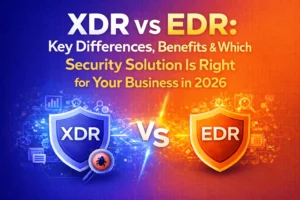
EDR vs XDR: Taking It Further
You may also see comparisons like:
Antivirus vs EDR vs XDR.
XDR stands for Extended Detection and Response.
EDR covers endpoints.
XDR expands coverage to include:
- Email systems
- Identity platforms
- Cloud applications
- Network traffic
For businesses heavily invested in Microsoft 365, identity-based attacks are increasing rapidly.
In those cases, endpoint detection alone may not provide full visibility. XDR integrates across systems.
But for most SMEs, implementing strong EDR with managed monitoring is the correct starting point.
Why Is EDR Required in 2026?
Because attackers don’t announce themselves.
They:
- Steal credentials quietly.
- Move laterally without malware.
- Exfiltrate data slowly.
- Encrypt only when ready.
Without behavioural monitoring, these activities often go unnoticed.
EDR reduces what’s called “dwell time” — the time attackers remain inside your systems.
The shorter the dwell time, the less damage.
Real-World Scenario: Antivirus vs EDR in Action
Let’s simulate.
An employee clicks a phishing email.
Malicious code runs silently.
The attacker harvests credentials and logs in later via remote desktop.
They escalate privileges and begin lateral movement.
Antivirus may detect nothing — because no known malicious file was involved.
EDR detects:
- Suspicious login behaviour
- Unusual privilege escalation
- Abnormal process chains
- Lateral network connections
The system flags it before ransomware deployment.
That’s the difference between inconvenience and operational shutdown.
EDR Tools: What to Look For
When evaluating EDR tools, businesses should assess:
- Real-time behavioural detection
- Automated containment
- Cloud intelligence integration
- Integration with SOC services
- Forensic visibility
- Compatibility with Microsoft 365 environments
- Scalability for hybrid teams
Leading enterprise solutions include platforms like CrowdStrike, Microsoft Defender for Endpoint, and other advanced behavioural security suites.
But tool selection matters less than implementation quality and monitoring capability.
Technology without oversight is noise.
The Role of Managed Monitoring (SOC + EDR)
EDR generates alerts.
Lots of them.
Without 24/7 monitoring, businesses risk alert fatigue.
That’s where managed security frameworks become essential — combining:
- Endpoint Detection
- Vulnerability scanning
- Network security
- Backup and disaster recovery
- Incident response
Organisations working with providers such as Code Hyper typically integrate endpoint detection into broader managed IT and cybersecurity services.
Because layered security wins.
Single-point tools fail.
Compliance & Australian Business Considerations
For Australian SMEs handling:
- Financial data
- Health records
- Client databases
- Intellectual property
Regulatory exposure increases risk impact.
Modern compliance frameworks increasingly expect:
- Advanced endpoint detection
- Log monitoring
- Incident response planning
Basic antivirus alone may not satisfy cyber insurance requirements in 2026.
EDR demonstrates proactive threat management.
Cost Comparison: Antivirus vs EDR
Antivirus:
Lower upfront cost
Limited protection
Reactive response
EDR:
Higher cost
Significantly lower breach risk
Reduced downtime
Faster containment
The real calculation isn’t license fees.
It’s breach impact.
Downtime alone can cost thousands per hour for Australian SMBs.
Add recovery costs and reputational damage — and EDR becomes an investment, not an expense.
Final Verdict: EDR vs Antivirus
If you’re running a home PC browsing casually, antivirus may be fine.
If you’re running a business in 2026:
- Using cloud services
- Supporting remote teams
- Handling sensitive data
- Operating under compliance pressures
EDR is baseline.
Not optional.
The conversation isn’t “EDR vs Antivirus.”
It’s:
“Are we equipped to detect threats we’ve never seen before?”
That’s the question modern businesses must answer.
And the organisations that answer it correctly are the ones that stay operational when others don’t.
Common Questions Answered
What is the difference between antivirus and EDR?
Antivirus detects known malware via signatures.
EDR detects suspicious behaviour and provides active response capabilities.
What is EDR?
Endpoint Detection and Response — continuous behavioural monitoring and incident response for devices.
Why is EDR required?
Because modern attacks bypass signature-based detection and operate through legitimate system tools.
Can EDR replace antivirus?
Most modern EDR solutions include antivirus capabilities, making standalone AV unnecessary in many deployments.
What is EDR security?
EDR security refers to endpoint-level detection and response within a broader cybersecurity framework.