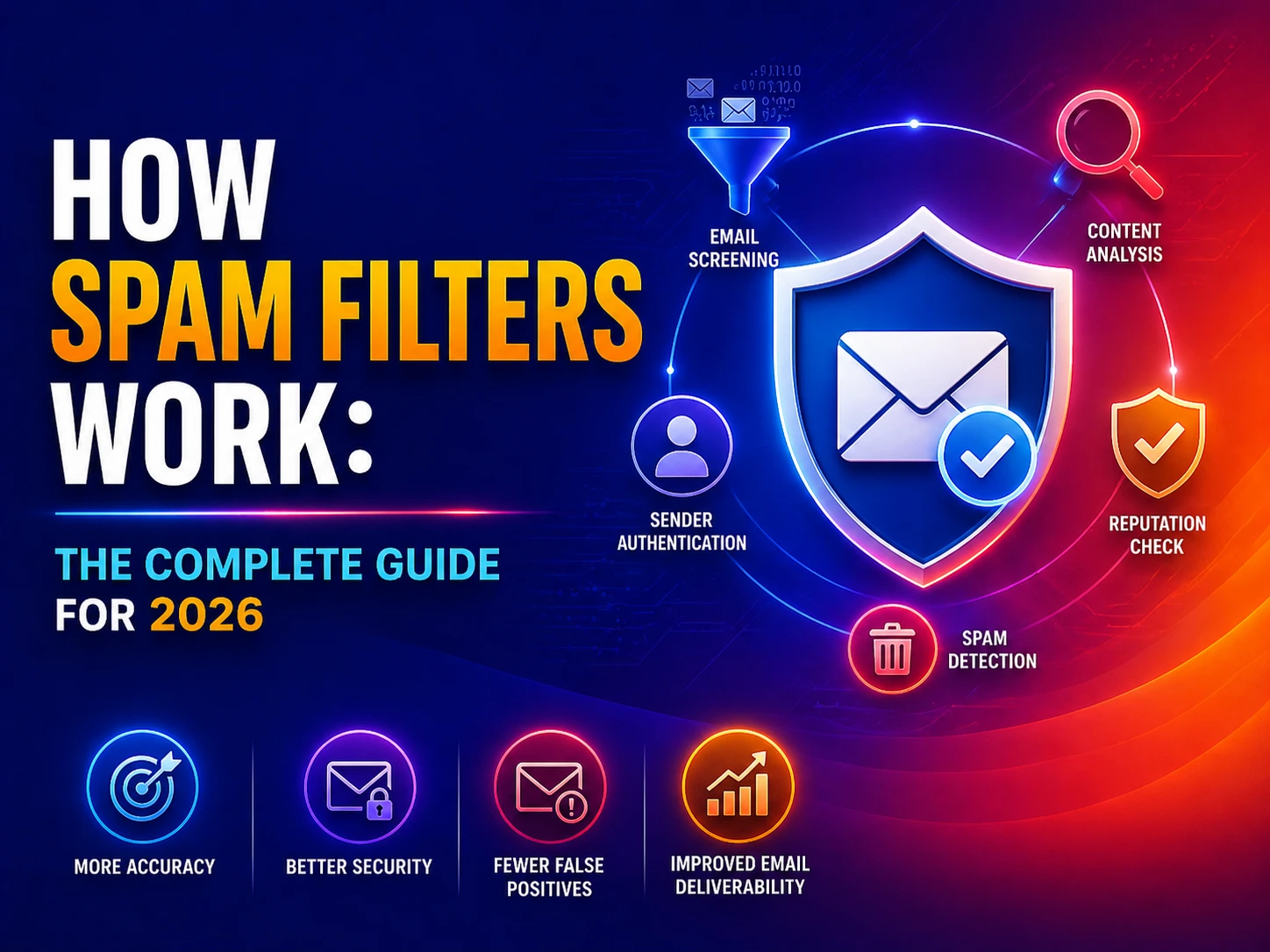
Most people think of spam as the digital equivalent of junk mail – annoying newsletters, promotional offers, and the occasional Nigerian prince. In 2026, that framing is dangerously outdated. The ASD’s Annual Cyber Threat Report recorded 87,400 cybercrime reports in a single year – and the majority of them began with an email that bypassed or was never subjected to proper spam filtering.
Business Email Compromise (BEC) – where attackers impersonate executives or suppliers to redirect payments – cost Australian businesses $84 million in 2023–24 alone. Ransomware, the costliest form of cyberattack for Australian SMBs, is most commonly delivered via email. Phishing attacks are now generated by AI, making them grammatically perfect, contextually convincing, and increasingly difficult for both humans and traditional filters to detect.
Spam filters are the first, and often most important, line of defence against all of it. But they are dramatically more sophisticated than most people realise – and dramatically more consequential when misconfigured or absent. This guide explains exactly how spam filters work in 2026: every filtering layer, every protocol, how AI has changed the game, what the 2025 Microsoft enforcement changes mean for your business, and what gaps in your current configuration might be letting threats through.
For immediate email security assessment, explore our email security gateway guide or our email spoofing prevention guide. Our managed cybersecurity services include email security configuration and monitoring for Australian businesses.
What ‘Spam’ Actually Means in 2026 – It’s Not Just Junk Mail
The word ‘spam’ originally referred to unsolicited commercial email – bulk promotional messages sent without the recipient’s consent. That category still exists. But in 2026, spam filters protect against a much broader and more dangerous threat landscape that includes:
Email Threat Type | What It Is & Why It Matters |
Bulk commercial spam | Unsolicited marketing email – annoying but usually harmless. The original spam filter target. Declining as a proportion of total email threats. |
Phishing emails | Fake emails impersonating trusted entities (banks, ATO, Microsoft, Australia Post) designed to steal credentials or financial information. The #1 email-based attack type. |
Spear-phishing | Targeted phishing personalised to a specific individual – referencing their name, employer, colleagues, or recent activities. Far harder to detect than generic phishing. |
Business Email Compromise (BEC) | Impersonation of executives, suppliers, or trusted contacts to authorise fraudulent payments or data disclosures. Cost Australian businesses $84M in 2023–24. |
Malware delivery | Emails with malicious attachments (Word macros, PDFs, executables) or links that download malware, ransomware, or remote access trojans when clicked. |
Credential harvesting | Emails with links to convincing fake login pages that capture Microsoft 365, banking, or SaaS credentials when users enter them. |
AI-generated phishing | Phishing emails written by large language models (LLMs) – grammatically perfect, contextually aware, personalised at scale. Increasingly bypassing traditional content-based filters. |
Spam for reputation damage | High-volume email from a domain designed to damage its sender reputation – used in competitive attacks or to set up secondary attacks on the target’s email infrastructure. |
Understanding this threat landscape explains why modern spam filters are layered, sophisticated systems – not simple keyword blockers. Each threat type requires different detection techniques, and no single filtering method catches all of them. This is why layered email security is the industry standard.
The 7 Layers of How Spam Filters Work
A modern enterprise spam filter – such as Microsoft Defender for Office 365 or a dedicated email security gateway – does not make a single decision about whether an email is spam. It evaluates each email through multiple sequential and parallel layers, each assessing a different dimension of risk. Only emails that pass all layers reach the inbox.
Layer 1: Connection and IP Reputation Filtering
The first filtering check happens before the email content is even received – at the connection level. When an external mail server attempts to deliver an email, the receiving filter checks the IP address of the sending server against several reputation databases:
- IP blacklists (Real-time Blackhole Lists – RBLs): maintained databases of IP addresses known to send spam or host malicious infrastructure. Spamhaus, Barracuda, and SURBL are major RBL providers. If a sending IP is on a blacklist, the connection is rejected before any email data is transmitted
- IP reputation scores: even IPs not on a blacklist receive a reputation score based on historical sending behaviour, complaint rates, bounce rates, and volume patterns. A brand-new IP address sending high volumes of email is suspicious regardless of content
- Geolocation and ASN checks: emails from certain geographic regions or Autonomous System Numbers (ASNs) associated with high spam volumes receive additional scrutiny
IP reputation filtering is fast and efficient – it rejects obvious spam at the connection level without the computational cost of content analysis. However, it misses threats from compromised legitimate servers (which have good IP reputations) and increasingly common cloud-based attacks using major platforms like AWS or Azure (which have legitimate IP ranges).
Layer 2: Email Authentication – SPF, DKIM, and DMARC
This is the layer that most spam filter guides – including both competitors ranking above us – completely fail to explain. Authentication protocols verify that an email actually comes from who it claims to come from. They are the primary defence against email spoofing and domain impersonation – the technical foundation of most BEC and phishing attacks.
SPF – Sender Policy Framework
SPF is a DNS record published by a domain owner that specifies which mail servers are authorised to send email on behalf of that domain. When a receiving mail server gets an email claiming to be from yourcompany.com.au, it queries the DNS for yourcompany.com.au’s SPF record and checks whether the sending server’s IP address is listed.
Example SPF record: v=spf1 include:spf.protection.outlook.com -all – this record says ‘only Microsoft’s Office 365 servers are authorised to send mail for this domain; reject all others’
What it stops: direct domain spoofing – an attacker pretending to send from your exact domain using a server not in your SPF record. SPF alone does not stop display name spoofing (showing a familiar name but sending from a different domain).
DKIM – DomainKeys Identified Mail
DKIM adds a cryptographic digital signature to every outgoing email. The sending mail server signs the email with a private key. The receiving server looks up the corresponding public key in DNS and verifies the signature – confirming that the email was not modified in transit and was sent by a server that controls the domain’s private key.
What it stops: man-in-the-middle tampering (modifications made to email content between sender and recipient) and some spoofing scenarios where the attacker cannot access the legitimate sending server’s private key.
DMARC – Domain-based Message Authentication, Reporting, and Conformance
DMARC is the policy layer that sits on top of SPF and DKIM. It tells receiving mail servers what to do when an email fails SPF or DKIM checks – and crucially, sends aggregate reports back to the domain owner showing authentication results across all email claimed to be from their domain.
DMARC has three policy levels:
- p=none: monitor only – take no action on failures, but report them. Used during initial deployment to understand the email landscape before enforcement
- p=quarantine: deliver failed emails to the recipient’s junk/spam folder rather than blocking them
- p=reject: block all emails that fail DMARC alignment – the strongest protection level. This is the policy that genuinely prevents domain spoofing and is what Australian spam filter best practice recommends
In 2025, both Microsoft and Google implemented significant enforcement changes: Microsoft’s Exchange Online Protection now requires SPF, DKIM, and DMARC alignment for high-volume senders, and Google’s Gmail enforces similar requirements. Australian businesses that have not published proper SPF, DKIM, and DMARC records may find their legitimate emails being marked as spam or rejected by recipients – the reverse of the spam filtering problem. Our dedicated guide on email spoofing prevention covers DMARC configuration in detail.
�� Authentication Protocol Quick Reference SPF: DNS record listing authorised sending servers for your domain → verifies WHERE the email came from. DKIM: Cryptographic signature attached to every email → verifies the email WASN’T TAMPERED WITH. DMARC: Policy record specifying how to handle SPF/DKIM failures → ENFORCES the outcome and provides REPORTING. All three together = the authentication foundation of modern email security. Missing any one creates exploitable gaps. |
Layer 3: Header Analysis
Every email carries an email header – a block of technical metadata invisible to the recipient that documents the complete journey of the email from sender to recipient. Spam filters analyse the header for inconsistencies that indicate manipulation or deception:
- ‘Received’ chain: lists every mail server the email passed through. Legitimate emails typically pass through 2–4 servers in a logical geographic sequence. Spam often has unusual routing – passing through servers in unexpected countries or through an unusually long chain
- Sender inconsistencies: the ‘From’ display name, the ‘From’ email address, the ‘Reply-To’ address, and the ‘Return-Path’ should all be consistent for legitimate email. Mismatches – like displaying ‘Microsoft Support’ but the actual address being ‘support@randomdomain.xyz’ – are strong spam signals
- Message-ID format: legitimate email servers generate Message-IDs in a specific format. Malformed or missing Message-IDs indicate non-standard sending infrastructure often used by spam tools
- X-Mailer headers: reveal what software generated the email. Headers from known bulk mailing software, or absence of expected headers from claimed sending platforms, are spam indicators
Layer 4: Content Analysis and Spam Scoring
Content analysis examines the body of the email, the subject line, embedded links, and attachments for patterns associated with spam or malicious content. Most content analysis uses a points-based scoring system – each suspicious element adds points to a spam score, and emails exceeding a threshold are quarantined or blocked.
Content signals that increase the spam score:
- Trigger words and phrases: ‘Congratulations you have won’, ‘Click here immediately’, ‘Your account has been suspended’, ‘URGENT ACTION REQUIRED’ – classic spam language patterns
- Excessive capitalisation and punctuation: ALL CAPS subject lines, multiple exclamation marks, and excessive use of bold or coloured text are spam signals
- HTML-to-text ratio: spam emails often use heavy HTML formatting to hide text from content scanners. A very high image-to-text ratio is suspicious
- Suspicious links: links whose display text shows one URL but actually navigate to a different URL (URL masking), links to newly registered domains, links using URL shorteners, and links to known phishing domains are all high-weight spam signals
- Attachment types: certain attachment types – .exe, .js, .vbs, macro-enabled Office files, password-protected archives – receive high spam scores by default
- Missing unsubscribe mechanism: bulk commercial email is legally required under Australia’s Spam Act 2003 to include a functional unsubscribe link. Absence of this link is a spam indicator
Layer 5: URL and Attachment Sandboxing
Modern email security gateways – including Microsoft Defender for Office 365’s Safe Links and Safe Attachments – do not just scan the surface of links and attachments. They detonate them in an isolated sandbox environment to observe what actually happens when the content executes.
- URL detonation (Safe Links): when a link is clicked (or at delivery time in advanced configurations), it is routed through a proxy that visits the URL in an isolated browser environment. If the page attempts to serve malware or capture credentials, the connection is blocked before it reaches the user. Time-of-click protection addresses URLs that are clean at delivery but change to malicious content hours later
- Attachment detonation (Safe Attachments): suspicious attachments are opened in an isolated virtual machine. If the attachment attempts to execute code, spawn child processes, connect to external servers, or modify system files, it is flagged as malicious and blocked before delivery
- Deep link inspection: email-embedded QR codes (increasingly used to bypass traditional URL scanning), redirect chains, and URL shorteners are all followed to their final destination for analysis
Sandboxing is computationally expensive and adds delivery latency – which is why it is applied selectively to high-risk attachments and URLs rather than all content. The threshold for triggering sandboxing is based on the earlier scoring layers.
Layer 6: Machine Learning and Behavioural Detection
Rule-based and signature-based filtering – blacklists, keyword scoring, known malware hashes – all have the same fundamental weakness: they only catch what they have already seen. Attackers specifically design new campaigns to avoid matching existing rules. Machine learning addresses this gap by detecting patterns and anomalies rather than specific signatures.
Modern spam filters use several machine learning approaches:
- Natural Language Processing (NLP): analyses email text for intent and semantic meaning, not just keyword matches. An email saying ‘please transfer the funds before close of business’ from an impersonated executive account can be flagged based on the meaning and urgency of the language, even if no individual word is on a blacklist
- Sender behaviour baselines: machine learning models build profiles of normal sending behaviour – volume, frequency, recipient patterns, content types, sending times. Deviations from these baselines flag potential account compromises or spoofing attempts
- Graph analysis: relationship graphs between senders and recipients across billions of emails identify unusual communication patterns. An email claiming to be from your CEO to the finance department, but from an address that has never emailed your organisation before, generates an anomaly signal
- Lookalike domain detection: ML models identify domain names designed to look similar to legitimate domains – microsoft-support.com, paypa1.com, australian-tax-0ffice.com – that pass traditional checks but are visually deceptive
Layer 7: User-Reported Spam and Feedback Loops
The final filtering layer is crowd-sourced: signals from users who mark email as spam or ‘not spam’ feed back into the learning system, continuously improving detection accuracy. When millions of users across a platform like Microsoft 365 or Gmail mark the same email pattern as spam, the filter rapidly learns to block similar patterns across all accounts.
The inverse – users marking legitimate emails as ‘not spam’ – trains the system to recognise valid sender patterns that may superficially resemble spam. This is why both marking spam correctly and regularly checking the junk folder for false positives are genuine security habits, not just housekeeping.
Types of Spam Filters: Where Does Filtering Happen?
The seven filtering layers above can be implemented in different types of spam filter deployments. Understanding where filtering happens helps you assess your current email security architecture.
Filter Type | How It Works | Best For |
Gateway / Perimeter Filter | A dedicated appliance or cloud service that sits in front of your mail server. All inbound email is routed through the gateway for filtering before reaching Exchange or Microsoft 365. Examples: Mimecast, Barracuda, Proofpoint. | Organisations wanting filtering independent of their email platform; Microsoft 365 customers wanting additional filtering layers beyond Microsoft’s defaults |
Integrated Cloud Email Security (ICES) | Filtering built directly into the email platform via API – no MX record change required. Analyses email after delivery using platform-native access. Examples: Microsoft Defender for Office 365, Google Workspace’s filtering. | Microsoft 365 and Google Workspace environments; preferred for tighter integration, post-delivery remediation, and behavioural analysis based on internal communication patterns |
On-Premises Server Filter | Filtering software running on an on-premises email server (e.g., Exchange with anti-spam agents). Older model – less common in 2026 as organisations move to cloud email. | Legacy environments still running on-premises Exchange; decreasing relevance as cloud migration continues |
Client-Side Filter | Filtering performed by the email client application (Outlook, Apple Mail) after email has been delivered. Adds a final layer of protection but limited in capability compared to server-side filtering. | Personal protection; supplementary to server-side filtering; primary filter only in very simple personal setups |
DNS-Based Filter (Email) | DNS-level filtering that blocks connections from blacklisted sending servers at the DNS resolution layer before email is even transmitted. Examples: Cloudflare Gateway, Cisco Umbrella email controls. | Fast blocking of known-bad infrastructure; most effective combined with other filter types; limited against novel threats |
For Australian businesses using Microsoft 365 – the dominant email platform – Exchange Online Protection (EOP) is enabled by default and provides baseline spam and malware filtering. Microsoft Defender for Office 365 Plan 1 and Plan 2 add advanced capabilities including Safe Links, Safe Attachments, anti-phishing policies, and attack simulation training. Microsoft 365 Business Premium includes Defender for Office 365 Plan 1 – our Microsoft 365 security guide explains the full security stack available within the Microsoft 365 licensing tiers.
The 2026 AI Arms Race: Why Traditional Spam Filters Are Struggling
The most significant development in email security in the past two years is AI-generated phishing – attackers using large language models (LLMs) to produce phishing emails that are grammatically flawless, contextually personalised, and free of the obvious tells that traditional filters were trained to catch.
Proofpoint’s 2025 State of the Phish Report found that AI-generated phishing emails had a 47% higher click rate than manually written phishing – and that traditional keyword-based filters missed up to 65% of AI-generated targeted phishing in controlled testing. The emails are too well-written, too contextually appropriate, and too personalised to match the patterns of mass spam that most filter rules were built around.
How AI-Generated Phishing Bypasses Traditional Filters
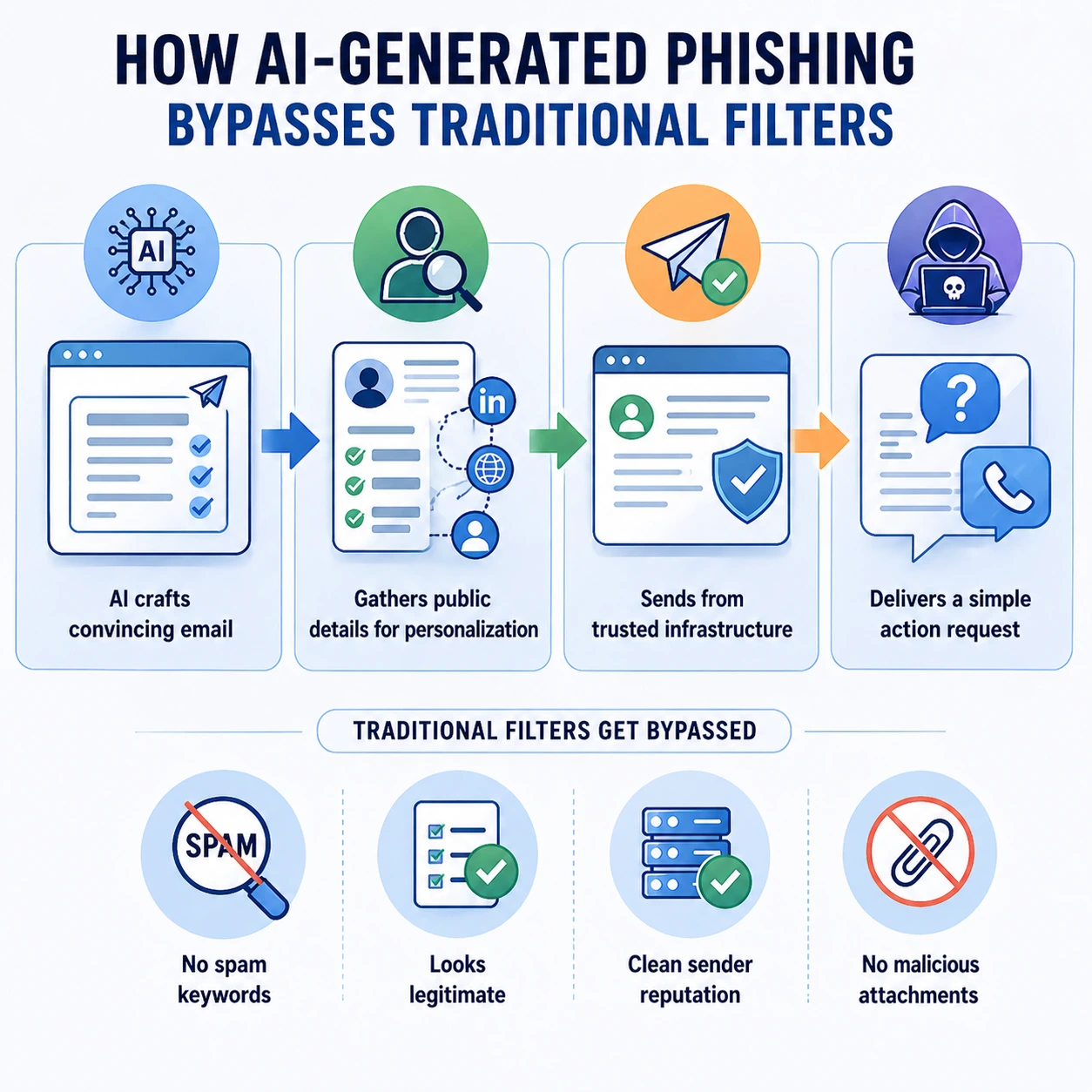
- No trigger keywords: LLMs are instructed to avoid common spam trigger phrases. The email might instead use natural business language: ‘Following up on our conversation earlier this week, please find the updated payment details below’
- Personalisation at scale: AI scrapes LinkedIn, company websites, and social media to personalise emails with correct names, titles, recent projects, and colleague references – making them pass the ‘does this feel right?’ human check that is the last line of defence
- Clean sending infrastructure: sophisticated attackers now use compromised legitimate accounts or aged domain infrastructure with good sender reputations, bypassing IP blacklists and reputation checks
- No malicious attachments: many AI-generated phishing attacks are pure social engineering – no link, no attachment, just a request to call a number or respond with information. Content-based filters have nothing to scan
How Modern Filters Are Adapting
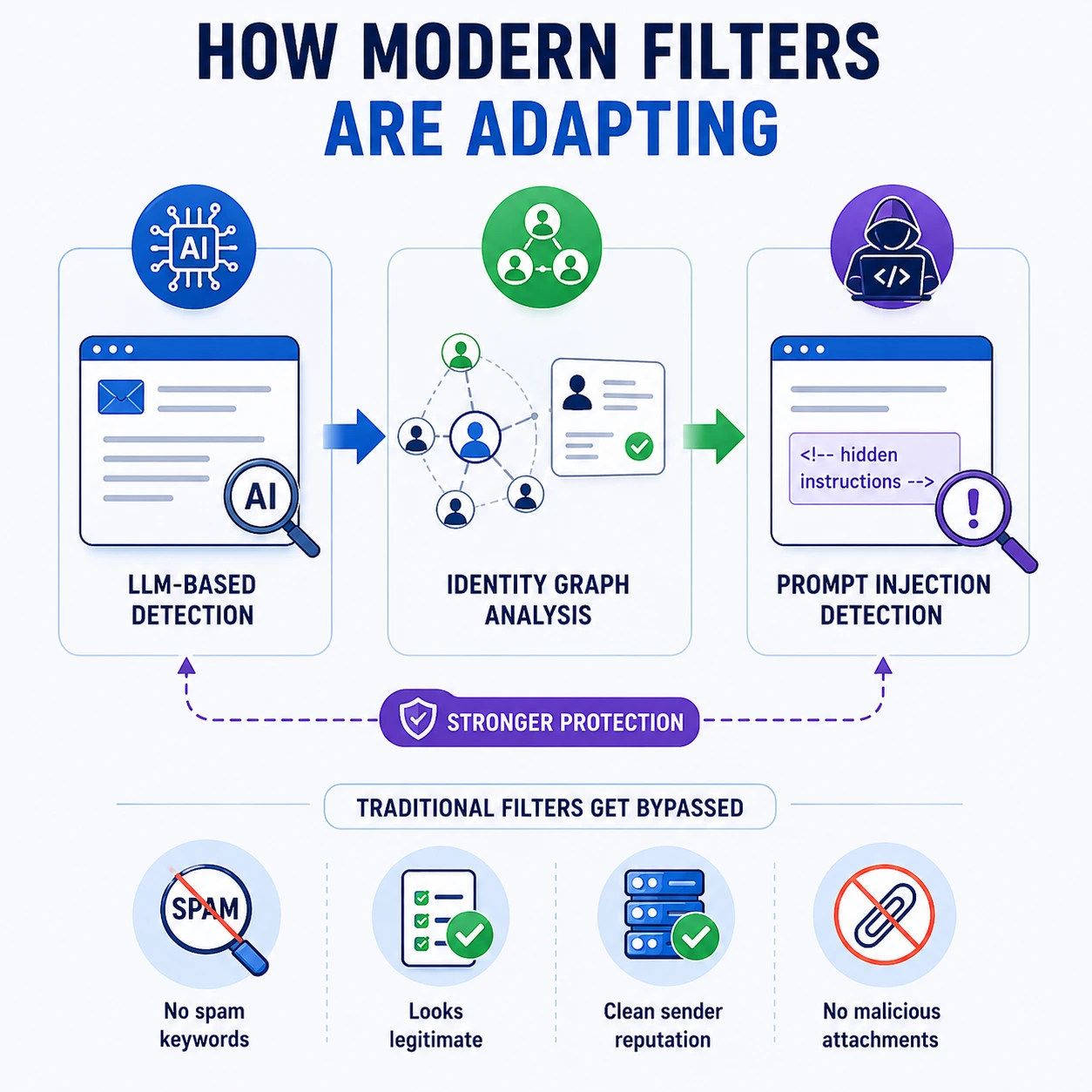
The response to AI-generated phishing has been to shift detection from content to context and behaviour:
- LLM-based detection: email security platforms now use their own AI models trained to recognise AI-generated text patterns and phishing intent from the semantic structure of messages, not individual keywords
- Identity graph analysis: does this email pattern match how this sender actually communicates with this recipient? Have they exchanged email before? Does the communication pattern fit their roles? Microsoft Defender and similar platforms maintain relationship graphs that make impersonation detectable even when content is clean
- Prompt injection detection: emerging threat – attackers embed instructions in email content attempting to manipulate AI email assistants like Microsoft Copilot. Next-generation filters now scan for prompt injection attempts in email body content
Spam Filtering and the Australian Regulatory Context
For Australian businesses, spam filtering has both a security dimension and a legal compliance dimension that is entirely absent from both competitor articles.
Australia’s Spam Act 2003
The Spam Act 2003 is Australia’s primary legislation governing commercial electronic messages. It applies to any Australian business that sends commercial email and establishes three core obligations:
- Consent: commercial email must only be sent with the recipient’s consent – either express consent (they opted in) or inferred consent (an existing commercial relationship). Sending unsolicited commercial email is a violation that can result in substantial penalties
- Identification: all commercial email must clearly identify who sent it. Anonymous or falsely identified commercial email violates the Act
- Unsubscribe mechanism: every commercial email must include a functional unsubscribe mechanism that must be honoured within 5 business days. Absence of unsubscribe is not only a spam filter trigger – it is a legal violation
The Australian Communications and Media Authority (ACMA) enforces the Spam Act. Penalties for serious violations can reach $2.1 million per day. Beyond compliance, proper Spam Act adherence also improves your sending reputation – spam filters from Microsoft and Google reward domains that maintain low complaint rates and proper unsubscribe compliance.
The ACSC and Business Email Compromise in Australia
The ACSC (Australian Cyber Security Centre) specifically highlights Business Email Compromise as one of the costliest cybercrime categories for Australian businesses. Unlike generic phishing, BEC attacks target specific individuals in finance, accounts payable, and executive roles – using impersonation of trusted contacts to authorise fraudulent transactions. Australia’s geographic isolation and strong trade relationships with Asia-Pacific make Australian businesses particularly targeted.
BEC attacks often originate from compromised legitimate email accounts – meaning the sending IP is reputable, the domain is legitimate, SPF and DKIM pass, and content analysis finds nothing suspicious. The only effective detection is behavioural analysis and identity graph anomaly detection – the most advanced capabilities of modern email security platforms. Configuring Microsoft Defender’s anti-impersonation policies specifically for Australian businesses’ most-contacted domains and executives is the most direct BEC mitigation available.
�� Case Study: How Proper Spam Filter Configuration Prevented a $340,000 BEC Fraud at a Melbourne Professional Services Firm
Case Study Snapshot Industry: Accounting & Business Advisory | Location: Melbourne, VIC | Staff: 62 | Threat: Business Email Compromise – impersonation of external auditor requesting payment redirection | Previous email security: Microsoft 365 with default EOP only | Upgrade: Defender for Office 365 Plan 1 + DMARC p=reject + Anti-impersonation policies | Fraudulent payment prevented: $340,000 | Detection method: Behavioural anomaly – impersonated domain detected by identity graph analysis |
The Situation
A 62-person Melbourne accounting firm had Microsoft 365 configured with Exchange Online Protection’s default settings – the baseline spam filtering included in all Microsoft 365 subscriptions. The firm had not published a DMARC record, had not configured Microsoft Defender for Office 365, and had not enabled any anti-impersonation policies. Their IT support company had advised that ‘Microsoft handles email security’ when the question was last raised.
A member of the finance team received an email appearing to come from the firm’s external auditor, requesting that upcoming payment details be updated due to a ‘banking system migration’. The email displayed the auditor’s name and company correctly, referenced an ongoing engagement by name, and used professional language with no obvious spam indicators. The email passed all EOP content checks – because it came from a lookalike domain registered 3 weeks earlier (not the auditor’s actual domain) with clean IP reputation and no malicious content.
Why the Fraud Was Attempted – and Then Caught
The finance team member was about to process the payment when the firm’s new IT managed service provider – engaged two months earlier – flagged an alert from Microsoft Defender for Office 365 Plan 1, which had been deployed as part of the onboarding process.
Defender’s anti-impersonation intelligence had flagged the email with a medium-confidence impersonation alert: the sending domain (auditorname-au.com) was similar but not identical to the auditor’s actual domain (auditorname.com.au), and critically, no email from this domain had ever been received by anyone in the organisation before. The identity graph showed zero prior relationship between this sending domain and any firm email address – inconsistent with an ongoing auditing engagement that would have involved weeks of prior email communication.
The DMARC record – published as part of the managed IT onboarding – had flagged the lookalike domain because it failed DMARC alignment against the auditor’s legitimate domain. Without DMARC, this check would not have been possible.
The Outcome
Results Fraudulent payment blocked: $340,000 | Detection method: Defender anti-impersonation + DMARC alignment check + identity graph anomaly | Time from email delivery to alert: 4 minutes | Previous configuration (EOP only) verdict on this email: Delivered to inbox (clean) | Post-incident configuration: DMARC p=reject published; anti-impersonation custom domains list expanded; finance team phishing simulation training conducted |
“Our old provider told us Microsoft sorts the email security. They sort the basic stuff. The BEC attack we nearly fell for wasn’t basic – it was targeted and professional. The new setup caught it because of how the sender’s identity didn’t match their history with us. That’s not a keyword check. That’s something much more intelligent.” – Managing Director, Melbourne Accounting Firm
Practical Spam Filter Management: False Positives, Allowlisting, and Quarantine
Understanding how spam filters work is one thing. Managing them in practice – especially for a business that depends on email for client communication – requires understanding how to handle the friction points: false positives, quarantine management, and allowlisting
Understanding False Positives
A false positive is a legitimate email incorrectly identified as spam and blocked or quarantined. False positives are the most operationally disruptive failure mode of spam filtering – they can cause missed contracts, delayed communications, and client service failures. Common causes of false positives:
- Sender not publishing SPF/DKIM/DMARC: many small Australian businesses and sole traders have not configured email authentication. Their legitimate emails are treated with higher suspicion because authentication checks fail
- Bulk-like sending patterns: newsletters, invoicing software, accounting platforms, and automated notifications sometimes match spam sending patterns in volume or timing
- Trigger words in business context: financial services emails containing words like ‘urgent’, ‘payment’, ‘immediately’, or ‘account suspended’ can trigger content scoring even when legitimately used
- New domain sending for the first time: a new client, supplier, or partner whose domain has no sending history receives lower trust scores on first contact
Quarantine vs Block – Understanding Each Disposition
Disposition | What Happens |
Deliver to inbox | Email arrives normally in the recipient’s inbox |
Deliver to Junk/Spam folder | Email arrives but is placed in the Junk folder |
Quarantine | Email is held in an admin-accessible quarantine for review before delivery or deletion |
Block (reject at gateway) | Email is rejected at the connection level and never enters the system |
Soft delete / retroactive removal | Email initially delivered but later removed from all inboxes |
Allowlisting – When and How to Use It Safely
Allowlisting is the practice of explicitly marking a sender, domain, or IP address as trusted – instructing the spam filter to deliver their emails without applying normal filtering rules. It should be used sparingly and deliberately, because allowlisting a domain means that domain’s emails bypass security checks entirely. If an allowlisted domain is compromised by an attacker, their malicious emails will be delivered to your inbox unrestricted.
- Safe to allowlist: specific IP addresses of known legitimate business partners whose emails are regularly false-positived; specific internal notification systems whose sending patterns trigger filters
- Never allowlist: broad domains like gmail.com, outlook.com, or any free email provider – attackers use these specifically because businesses tend to allowlist them; external organisations that haven’t been vetted for email security standards
- Best practice: use allowlisting for specific sender addresses rather than entire domains where possible; review the allowlist quarterly and remove entries that are no longer required
Your Spam Filter Is Only as Good as Its Configuration
Modern spam filters are genuinely sophisticated systems – but their effectiveness depends entirely on how they are configured, maintained, and monitored. Microsoft 365’s default Exchange Online Protection provides baseline protection. It did not catch the $340,000 BEC attempt in the Melbourne case study above. Properly configured Defender for Office 365, with DMARC published and anti-impersonation policies tuned – did.
For Australian businesses, the gap between ‘we have a spam filter’ and ‘our spam filter is properly configured’ is the gap between catching a targeted attack and losing hundreds of thousands of dollars to fraud. The configuration details – DMARC policy, anti-impersonation rules, Safe Links settings, quarantine policies – are not set-and-forget. They require expertise to implement correctly and ongoing attention to maintain.
At CodeHyper, we configure and manage email security for Australian businesses using Microsoft 365 – including DMARC implementation, Defender for Office 365 policy configuration, anti-phishing and anti-impersonation tuning, and ongoing monitoring. Our managed cybersecurity services include email security as a core component, and our email security gateway guide explains the full range of options available.
For a free email security assessment – including a check of your SPF, DKIM, and DMARC configuration – contact us today.
Frequently Asked Questions: How Spam Filters Work
How do spam filters work?
Spam filters analyse every incoming email through multiple layers: connection-level IP reputation checks, email authentication verification (SPF, DKIM, DMARC), header analysis for inconsistencies, content analysis using keyword scoring, URL and attachment sandboxing, machine learning behavioural detection, and user feedback signals. Emails that accumulate enough suspicious signals across these layers are quarantined, blocked, or delivered to junk rather than the inbox.
What are SPF, DKIM, and DMARC?
SPF (Sender Policy Framework) is a DNS record that lists which mail servers are authorised to send email from your domain – it stops direct domain spoofing. DKIM (DomainKeys Identified Mail) adds a cryptographic signature to every outgoing email, verifying it wasn’t tampered with in transit. DMARC (Domain-based Message Authentication, Reporting, and Conformance) is the policy layer that tells receiving servers what to do when emails fail SPF or DKIM checks – from monitoring only (p=none) to blocking (p=reject). Together, these three protocols are the authentication foundation of modern email security. Our email spoofing prevention guide covers implementation in detail.
Why is a legitimate email going to spam?
Legitimate emails end up in spam for several common reasons: the sender has not published SPF, DKIM, or DMARC records (authentication failure); the email contains content patterns that match spam scoring triggers (urgent language, payment references, all-caps subject lines); the sender’s IP address has a poor sending reputation from previous bulk mail; the sender’s domain is new with no established reputation; or the recipient’s spam filter is configured conservatively. If a specific sender’s emails consistently go to junk, allowlisting that specific sender address (not the entire domain) in your email security platform is the most targeted fix.
What is Business Email Compromise (BEC) and do spam filters stop it?
Business Email Compromise is an attack where a criminal impersonates an executive, supplier, or trusted contact to trick finance staff into authorising fraudulent payments or disclosing sensitive information. Traditional content-based spam filters often miss BEC attacks because the emails contain no malicious links or attachments and use professional language. Modern spam filters with identity graph analysis and anti-impersonation policies – like Microsoft Defender for Office 365 – are significantly more effective against BEC because they detect sender identity anomalies rather than content patterns. Our email security guide covers BEC-specific protections in detail.
How does AI affect spam filtering in 2026?
AI affects spam filtering on both sides of the equation. Attackers now use large language models (LLMs) to generate phishing emails that are grammatically perfect, contextually personalised, and specifically designed to avoid traditional filter triggers – bypassing keyword-based detection. In response, spam filter platforms have deployed their own AI models that detect phishing intent from semantic meaning rather than keywords, analyse sender behaviour against relationship baselines, and identify AI-generated text patterns. The 2026 email security landscape is increasingly an AI-vs-AI arms race where the most advanced platforms have a significant edge.
What is the difference between spam and phishing?
Spam is the broad category of unsolicited or unwanted email – including commercial marketing email, bulk promotions, and junk. Phishing is a specific attack type within the broader email threat landscape where the email is designed to deceive the recipient into taking a harmful action – clicking a malicious link, entering credentials on a fake site, or authorising a fraudulent payment. All phishing is a form of spam (it is unsolicited and unwanted), but not all spam is phishing. Spam filters protect against both, but phishing requires more sophisticated detection techniques than bulk commercial spam.
What is email quarantine?
Email quarantine is a holding area where suspected spam or malicious emails are placed for review rather than being delivered to the inbox or blocked outright. Quarantined emails are accessible to administrators (and in some configurations, end users via a quarantine digest) for review and release if legitimate. Quarantine is used for medium-confidence detections where the filter is not certain enough to block but not confident enough to deliver. Regular review of quarantined email is important – both to release false positives and to confirm genuine threats are being caught.
Does Microsoft 365 include spam filtering?
Yes. Microsoft 365 includes Exchange Online Protection (EOP) in all subscription plans, providing baseline spam and malware filtering. Microsoft 365 Business Premium and enterprise plans also include Microsoft Defender for Office 365 Plan 1, which adds advanced capabilities: Safe Links (URL detonation with time-of-click protection), Safe Attachments (sandboxing for suspicious files), anti-phishing policies with impersonation protection, and attack simulation training. EOP provides baseline protection; Defender for Office 365 provides enterprise-grade email security. Our Microsoft 365 security guide explains how to maximise the security capabilities within your Microsoft 365 subscription.
Is Australia’s Spam Act relevant to spam filters?
Yes, from two directions. First, as a business receiving spam, the Spam Act 2003 is the legislation that makes bulk unsolicited commercial email illegal in Australia – spam filters enforce this protection at the technical level. Second, as a business sending email, the Spam Act imposes obligations on your own sending practices: you must have consent to send commercial email, identify yourself clearly, and include a functional unsubscribe mechanism. Compliance with the Spam Act also improves your email domain’s sender reputation – which directly affects whether your legitimate emails are filtered as spam by your recipients’ systems.
How do I check if my spam filter is configured correctly?
The most important checks for Australian businesses using Microsoft 365 are: (1) verify your SPF, DKIM, and DMARC records are published and correct using a free tool like MXToolbox; (2) confirm DMARC is at minimum p=quarantine (p=reject is recommended for full protection); (3) verify Microsoft Defender for Office 365 is configured with anti-phishing and anti-impersonation policies; (4) test that safe links and safe attachments are active; and (5) review your quarantine digest for patterns in what is being caught and released. Contact our team for a free email security assessment that covers all of these checks for your specific Microsoft 365 environment.