About This Article This guide was produced by the engineering and cloud advisory team at CodeHyper, a Sydney-based managed IT and cloud services provider. Our team has designed, migrated, and optimised cloud environments for Australian SMBs across professional services, healthcare, construction, and retail. The strategies in this guide reflect real findings from those engagements — not theoretical frameworks. Industry statistics are sourced from Flexera’s State of the Cloud Report and Gartner cloud spend research. |
Here is a number that should make every business owner uncomfortable: according to Flexera’s State of the Cloud Report, organisations waste an average of 35% of their total cloud spend every year. On a $10,000/month cloud bill, that is $3,500 a month — $42,000 a year — generating zero business value.
The cloud was supposed to make IT cheaper. For many Australian businesses, it has done the opposite. Development servers run 24/7 that nobody uses. Virtual machines are sized for theoretical peak loads that never happen. Storage accumulates without any lifecycle policy. Licences sit unused for departed staff. And nobody can tell you exactly where the money is going because nobody has turned on tagging.
The frustrating truth is that cloud waste is almost entirely preventable. The businesses that control their cloud spend don’t have better technology — they have better habits, governance, and architecture decisions. This guide covers all of it: the 12 highest-impact cloud cost optimization strategies for 2026, a real-world Australian case study, the tools available to you right now, and exactly where to start.
If you’re planning a cloud migration and want to avoid building waste into your architecture from day one, our cloud migration services include cost modelling as a core deliverable. If you’re already in the cloud and need to cut spend without cutting performance — read on.
Why Cloud Bills Spiral Out of Control (And It’s Not What You Think)
Most businesses blame cloud cost overruns on their cloud provider. The real cause is almost always internal — decisions made (or not made) during and after migration that let waste accumulate invisibly.
The core problem is the operational model mismatch. On-premises IT runs on capital expenditure — you buy servers every 3–5 years and the cost is fixed. Cloud runs on operational expenditure — every resource you deploy generates a charge, every hour, every day. Unless your team operates with the same financial discipline that cloud pricing demands, bills drift upward by default.
Root Cause of Cloud Waste | Typical Share of Wasted Spend |
Over-provisioned compute (VMs too large for actual workload) | 20 – 30% |
Idle and zombie resources (forgotten dev/test environments) | 15 – 25% |
Unoptimised storage (wrong tier, orphaned volumes, old snapshots) | 10 – 15% |
On-demand pricing used where Reserved Instances would apply | 10 – 20% |
Excessive data egress and cross-region transfer charges | 8 – 12% |
Uncontrolled autoscaling without cost guardrails | 5 – 10% |
No tagging / cost allocation — invisible spend across teams | Compounds every category above |
Understanding your specific waste profile is the starting point for any serious optimisation effort. A structured cloud security and infrastructure assessment surfaces these inefficiencies and gives you a prioritised roadmap with estimated savings per initiative.
12 Cloud Cost Optimization Strategies That Deliver Real Results
1. Make Every Dollar Visible: Implement Tagging and Cost Allocation
You cannot optimise what you cannot see. Comprehensive resource tagging — attaching metadata to every cloud resource that identifies the owning team, project, environment, and cost centre — is the non-negotiable foundation of every other strategy on this list. Without it, your cloud bill is a mystery. With it, every dollar of spend is attributed to a specific business decision.
- Enforce tagging at deployment: use Azure Policy or AWS Service Control Policies to block untagged resources from being created
- Minimum tag set: Owner, Project, Environment (prod/dev/test), CostCentre, ExpiryDate
- Report by team monthly: publish team-level cloud cost reports — when engineers see the bill for their infrastructure, spending behaviour changes within weeks
- Retroactively tag existing resources: schedule a tagging sprint for untagged legacy resources — this one exercise often reveals forgotten environments worth thousands per month
2. Right-Size Your Compute — The Single Biggest Quick Win
The average cloud VM runs at 15–30% CPU utilisation. The rest of that compute capacity sits idle, fully billed, generating nothing. Right-sizing — matching instance types and sizes to actual workload demands — typically delivers 20–30% compute savings and can often be implemented within a single sprint.
- Baseline first: collect 4–8 weeks of CPU, memory, and network utilisation data before making any changes
- Flag rightsizing candidates: any instance averaging below 40% CPU is a candidate for downsizing
- Use burstable instance types: Azure B-series and AWS T-series are significantly cheaper for workloads with intermittent demand — they run at a baseline CPU level and burst when needed
- Review quarterly: workload profiles change as applications evolve — set a recurring calendar reminder to review utilisation data every quarter
- Use native tooling: Azure Advisor and AWS Compute Optimizer generate automated rightsizing recommendations — these are free and available in every account
3. Hunt Down Zombie Resources — Free Money Hiding in Plain Sight
Zombie resources — compute instances, storage volumes, load balancers, reserved IP addresses, and snapshots that were created for a project and never decommissioned — account for 15–25% of cloud spend in unmanaged environments. They are the closest thing to free savings in cloud cost management because eliminating them carries zero risk of performance impact.
- Run a monthly idle audit: list all compute instances with zero or near-zero connections and CPU utilisation in the past 14 days
- Delete unattached storage volumes: when a VM is deleted, its attached storage often persists — scan for and remove orphaned volumes monthly
- Purge outdated snapshots: implement automated snapshot policies with expiry rules — keeping only the most recent 3–5 snapshots per volume is sufficient for most workloads
- Tag resources with an expiry date at creation: automation can then flag or terminate resources past their expiry date without manual intervention
4. Stop Paying On-Demand for Predictable Workloads
Paying on-demand rates for workloads that run continuously 24/7 is one of the most expensive mistakes in cloud financial management. Reserved Instances and Savings Plans offer discounts of 30–70% in exchange for a 1 or 3-year usage commitment — applied to workloads with predictable, stable demand.
Commitment Type | Discount vs On-Demand | Best Fit |
1-Year Reserved Instance | 30 – 40% | Stable workloads with known requirements that may evolve |
3-Year Reserved Instance | 50 – 70% | Core infrastructure (domain controllers, databases, file servers) |
Compute Savings Plans (AWS) | 30 – 66% | Flexible workloads that may change instance family or region |
Azure Hybrid Benefit | Up to 49% | Windows Server and SQL Server — reuse existing on-prem licences |
Spot / Azure Spot VMs | 60 – 90% | Fault-tolerant batch, CI/CD agents, dev/test, stateless processing |
The discipline is segmenting your workloads: reserve the baseline, pay on-demand for the variable portion, use spot for interruptible tasks. Businesses that treat cloud commitments as a financial portfolio — buying reservations strategically and reviewing coverage monthly — consistently outperform those who buy ad hoc.
5. Implement Cloud Storage Lifecycle Policies
Storage is a silent cost killer. Individual charges seem small, but unmanaged storage accumulates continuously without any performance benefit. Most businesses pay premium hot-tier rates for data they access once a quarter — the equivalent of storing archived boxes in prime real-estate office space.
- Implement lifecycle policies immediately: automatically transition objects from hot → cool after 30 days, cool → archive after 90 days
- Delete orphaned snapshots and volumes: unattached disks and outdated VM snapshots are pure waste — automate their identification and removal
- Use deep archive for compliance retention: Azure Blob Archive and AWS Glacier Instant Retrieval reduce storage costs by up to 80% vs hot storage for data that must be kept but is rarely accessed
- Right-tier redundancy: geo-redundant storage (GRS) costs significantly more than locally redundant (LRS) — use GRS only where your recovery requirements genuinely justify it
- Audit and consolidate storage accounts: dozens of fragmented storage accounts across projects add management overhead and obscure cost attribution
How you architect cloud storage from the start determines how much you’ll pay indefinitely — getting tiering and lifecycle policies right at deployment prevents expensive remediation later. See our dedicated cloud storage guide for a full breakdown of storage options and cost trade-offs.
6. Reduce Data Egress Charges
Cloud providers charge generously for data entering their networks and significantly for data leaving. Egress fees — charged on data sent to the internet, transferred between regions, or moved between cloud providers — are one of the most surprising and frustrating cloud bill line items for businesses that don’t plan for them.
- Co-locate data and compute: services should live in the same region as the data they consume — cross-region transfers accumulate quickly
- Use Private Link / PrivateLink: Azure Private Link and AWS PrivateLink route traffic within the provider’s backbone rather than the public internet — both cheaper and more secure
- Deploy a CDN for static assets: Azure CDN or Amazon CloudFront dramatically reduces origin bandwidth costs for web applications serving files, images, or media
- Compress data in transit: gzip or Brotli compression on API responses and data exports reduces egress volume and cost proportionally
- Audit multi-cloud data flows: if workloads span AWS and Azure, map every cross-cloud call and evaluate whether consolidation or caching can reduce transfer volumes
7. Automate Shutdown Schedules for Non-Production Environments
Development, test, staging, and QA environments don’t need to run at midnight. Implementing automated shutdown schedules — powering down non-production resources outside business hours and over weekends — is one of the highest-return actions in cloud cost optimization. A development environment that runs 12 hours a day, 5 days a week instead of 24/7 reduces compute cost for that environment by 64% immediately.
- Azure Automation / AWS Lambda: schedule shutdown scripts as serverless functions — no dedicated compute required to run the automation
- Tag-driven automation: apply an AutoShutdown:True tag to non-production resources and let automation discover and manage them dynamically as new environments are created
- Self-service resume: give developers a simple way to restart environments on demand — removing friction ensures automation adoption sticks
- Extend to databases and caches: managed database services like Azure SQL and ElastiCache can also be paused in development — don’t stop at compute
8. Architect for Cost Efficiency — Not Just Performance
Architecture decisions made during design have a compounding effect on cost that becomes harder to undo over time. Monolithic VMs, synchronous tight-coupling between services, and over-engineered redundancy all generate ongoing costs that better architectural patterns avoid entirely.
- Adopt serverless for event-driven workloads: Azure Functions and AWS Lambda charge per execution — zero cost during idle periods, automatic scaling under load
- Use managed services over self-managed: Azure SQL Database, AWS RDS, and managed Kubernetes eliminate the operational overhead of managing infrastructure components that add cost without adding differentiation
- Apply autoscaling everywhere: configure horizontal autoscaling for all stateless tiers with minimum, desired, and maximum instance counts — cap maximum to prevent bill shock
- Use asynchronous patterns for batch work: message queues (Azure Service Bus, SQS) decouple components and allow batch processing on cheaper spot instances rather than always-on compute
Architecture is the area where the difference between a well-planned cloud migration and a hasty lift-and-shift is most financially consequential. Our cloud migration services include cost architecture reviews for every workload before migration.
9. Build a FinOps Culture — Make Cost Everyone’s Responsibility
The most sophisticated cost optimization tools deliver zero value if nobody acts on their outputs. Cloud FinOps is the discipline of creating shared financial accountability for cloud spend across engineering, finance, and business teams — making cost efficiency a first-class engineering concern, not just a CFO problem.
- Monthly cross-functional cloud reviews: bring engineering and finance together to examine spend, explain variances, and identify optimisation opportunities — 60 minutes a month prevents thousands in waste
- Team-level budgets and alerts: when teams own their cloud bill and receive alerts at 80% and 100% of budget, spending behaviour changes fundamentally
- Unit cost metrics: measure cost per user, per transaction, or per API call — normalised metrics connect cloud spend to business outcomes and make efficiency visible to non-technical stakeholders
- Recognise optimisation wins: celebrate engineers who find and fix cloud waste — making efficiency culturally valued sustains the discipline far longer than top-down mandates
Our IT management consultancy team helps Australian businesses design the governance frameworks and cultural practices that make FinOps sustainable — not just a one-time cleanup exercise.
10. Automate Cost Governance and Enforce Guardrails
Manual cost management doesn’t scale. As cloud environments grow in complexity, the only way to sustain cost discipline is through automation and policy enforcement — identifying waste as it appears, not weeks later when the invoice arrives.
- Azure Advisor / AWS Trusted Advisor: free, built-in tools that continuously analyse your environment and generate prioritised cost recommendations — review and action weekly
- Policy-based deployment controls: use Azure Policy or AWS Service Control Policies to prevent deployment of non-compliant (and expensive) resource configurations without prior approval
- Budget actions: configure automated responses when budgets are exceeded — from email alerts to automatic shutdown of non-critical resources
- Third-party FinOps platforms: tools like Apptio Cloudability, CloudHealth by VMware, or Spot by NetApp provide advanced multi-cloud visibility and automated optimisation capabilities beyond what native tooling offers
11. Audit and Optimise SaaS Licences
For most Australian SMBs, Microsoft 365 licences represent one of the top three cloud cost line items — and one of the least scrutinised. Over-licensed seats, premium plans assigned to light users, and accumulated add-on subscriptions are common sources of SaaS waste that a quarterly audit consistently reclaims.
- Identify inactive licences: users who haven’t logged in for 30+ days are candidates for licence removal or downgrade
- Segment by actual feature use: not every employee needs Business Premium — light users on email-only plans can be moved to Business Basic at a fraction of the cost
- Review add-on subscriptions quarterly: audio conferencing, Visio, Project, Power BI — these add $10–25/user/month and accumulate unnoticed
See our analysis of Microsoft 365 security defaults and licence optimisation for practical guidance on getting more value from your Microsoft investment.
12. Monitor, Report, and Iterate — Optimisation Is Never Finished
Cloud cost optimisation is not a project with a completion date. It is an ongoing operational discipline. Cloud environments change constantly — new workloads are deployed, traffic patterns shift, teams grow. Without continuous monitoring and periodic reviews, waste re-accumulates within months of any cleanup exercise.
- Set up a monthly optimisation cadence: a structured 60-minute review covering spend vs budget, top cost drivers, utilisation anomalies, and new advisor recommendations
- Track KPIs over time: monitor waste rate, RI coverage %, tagging compliance %, and cost-per-unit-of-business-value month over month
- Review architecture annually: workloads that made sense on VMs 18 months ago may be better served by serverless or containers today — periodic architecture reviews find these opportunities
- Benchmark against industry: Flexera’s annual State of the Cloud Report provides benchmarks — knowing where you stand relative to peers drives accountability
�� Real-World Case Study: How a Sydney Professional Services Firm Cut Cloud Spend by 41%
The Situation
A mid-sized Sydney-based legal firm with approximately 120 staff had migrated their entire on-premises environment to Microsoft Azure 18 months prior. The migration was executed under time pressure — the firm’s data centre lease was expiring — and was a near-complete lift and shift. No architectural optimisation was performed during migration; the priority was simply getting off the physical hardware before the deadline.
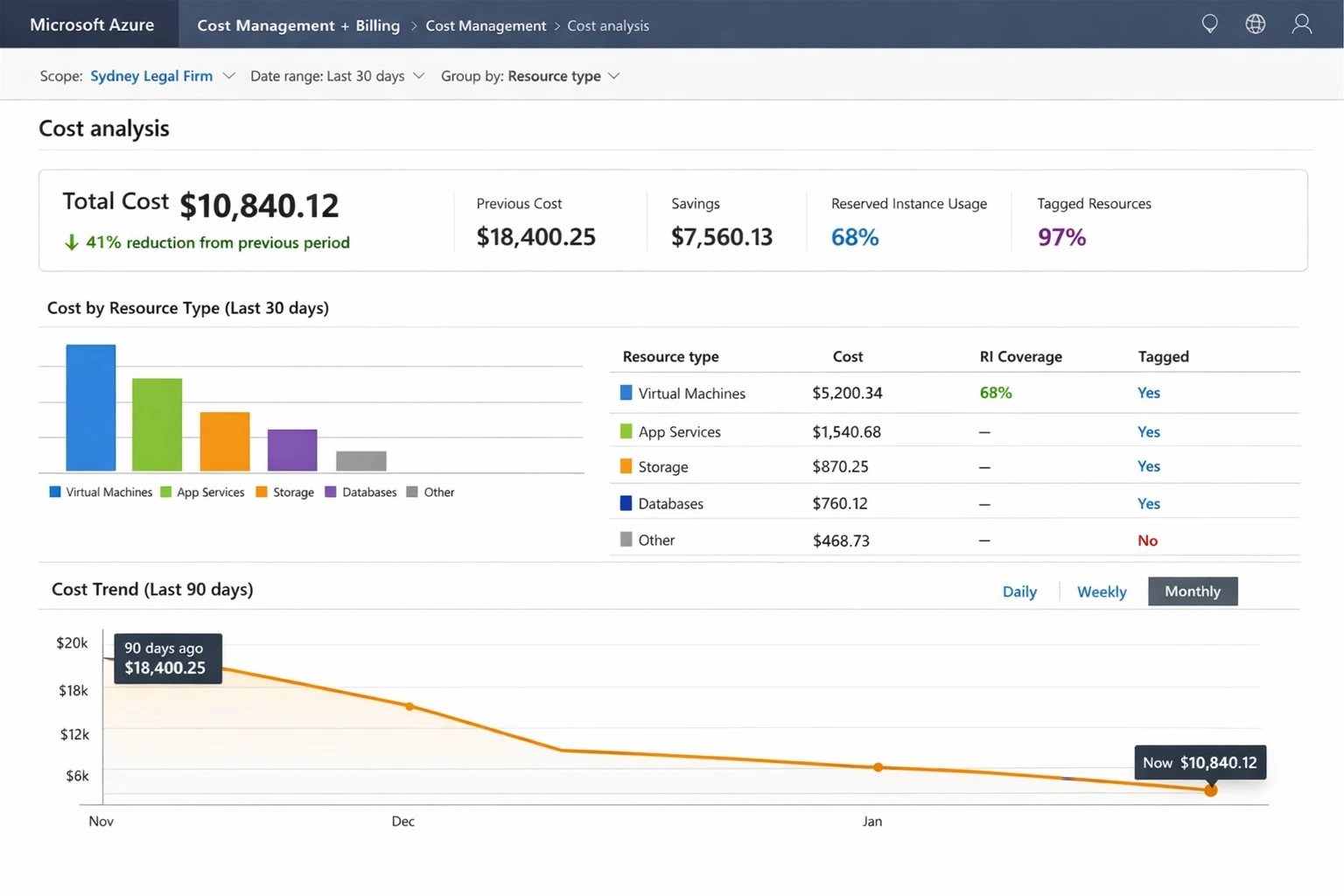
Eighteen months later, the firm’s IT manager contacted CodeHyper after their Azure bill had grown to $18,400 per month — significantly higher than their original pre-migration estimate of $11,000–12,000. Despite the cloud, performance had not materially improved, and the IT manager had no clear picture of what was driving the cost increase.
What We Found
A CodeHyper cloud cost assessment — a structured 2-week analysis of the firm’s Azure environment — revealed the following:
- Compute overprovisioning: 14 of the firm’s 22 active virtual machines were running at average CPU utilisation below 18%. Six were sized at D4s v3 (4 vCPUs, 16GB RAM) for workloads that never exceeded 2 vCPUs. Annual waste from overprovisioned compute alone: approximately $38,000
- Zombie development environments: 4 virtual machines and 3 SQL databases created for an internal project 11 months earlier had never been decommissioned. They were generating $1,240/month in charges. None of the current IT staff knew they existed
- No Reserved Instance coverage: 100% of the firm’s compute was on on-demand pricing. Their core infrastructure — domain controllers, file servers, the practice management database — had been running continuously for 18 months with zero variation. These workloads were prime 3-year reservation candidates
- Storage waste: the firm had accumulated 847 VM snapshots across their environment — the result of 18 months of daily automated snapshots with no expiry policy. 94% of these snapshots were older than 30 days and served no legitimate recovery purpose. Monthly cost: $870 in snapshot storage alone
- No tagging: zero resources were tagged with team or project attribution — the entire $18,400/month bill was unattributed and unaccountable
What We Implemented
- Rightsized 11 virtual machines based on 6-week utilisation baselines — moving from D4s v3 and D2s v3 instances to B-series burstable instances appropriate for each workload’s actual demand profile
- Decommissioned all zombie resources after confirmation with the relevant stakeholders — the 4 VMs and 3 databases were cleanly removed with a full backup retained for 30 days
- Purchased 3-year Reserved Instances for the firm’s 8 core always-on workloads (domain controllers, file server, practice management system, email archiving) — coverage at 3-year rates for these predictable, stable workloads
- Implemented a snapshot lifecycle policy retaining only the 7 most recent daily snapshots per volume — deleted 798 outdated snapshots and set up automated cleanup going forward
- Deployed comprehensive tagging across all resources with Owner, Department, Environment, and ExpiryDate tags — and configured Azure Policy to prevent future deployment of untagged resources
- Configured auto-shutdown for 6 non-production VMs (development and testing environments) to shut down at 7:00 PM AEST and restart at 7:30 AM on business days
The Results
Outcomes at 90 Days Monthly Azure spend: $18,400 → $10,840 | Monthly saving: $7,560 | Annual saving: $90,720 | Waste rate: reduced from ~41% to under 9% | RI coverage: 0% → 68% of compute spend | Tagged resources: 0% → 97% |
The firm’s IT manager reported that beyond the cost savings, the tagging and cost allocation work had an unexpected cultural benefit: for the first time, department heads could see the cloud cost associated with their own teams’ infrastructure — which immediately generated internal conversations about right-sizing that the IT team had previously been unable to initiate from a purely technical angle.
“We knew the bill was too high, but we had no idea it was this fixable. The biggest surprise was how much we were paying for things that weren’t doing anything. Within three months, CodeHyper had turned a monthly expense we were embarrassed about into something we could actually defend to the partners.” — IT Manager, Sydney Legal Firm
Where to Start This Week: 5 Actions That Cost Nothing to Implement
If you’ve read this far but aren’t sure where to begin, start here. These five actions require no budget, no new tools, and no significant technical expertise — just a few hours and the willingness to look.
- Turn on Azure Advisor or AWS Trusted Advisor. It’s free, it’s already analysing your environment, and it generates prioritised cost recommendations immediately. Review the top 10 and action whatever you can this week.
- Set a monthly budget alert. Log into your cloud console right now and configure an alert at 80% and 100% of your expected monthly spend. This single action prevents bill shock and creates accountability.
- Find your top 5 most expensive resources. Sort your cloud bill by cost. Look at utilisation data for the top 5 line items. At least one will be a rightsizing candidate or an idle resource.
- Schedule a dev/test shutdown. Identify your non-production environments. Configure a shutdown schedule for tonight. You will see the saving on tomorrow’s cost dashboard.
- List untagged resources. Pull a report of resources with no cost allocation tags. Every untagged resource is invisible spend. Start the tagging conversation with your team.
How to Measure Cloud Cost Optimisation Success
Tracking the right metrics ensures optimisation efforts are sustained and results are visible to business stakeholders, not just the IT team.
KPI | What It Tells You and Target Benchmark |
Cloud Waste Rate | % of total spend on unused/underutilised resources — target below 15% (industry average is 35%) |
Reserved Instance / Savings Plan Coverage | % of compute covered by commitments — target 60–80% for stable environments |
Rightsizing Recommendations Actioned | % of advisor recommendations implemented — below 50% indicates governance gaps |
Tagging Compliance Rate | % of resources with complete cost allocation tags — target 95%+ |
Month-over-Month Cost per Unit | Cloud cost per user / per transaction — growth in this metric signals waste accumulation |
Budget Variance % | Actual vs forecast — large variances indicate forecasting gaps or uncontrolled spend |
Non-Production Hours (% of business hours) | Dev/test environments running outside business hours — target 0% with proper scheduling |
Cloud Cost Optimisation in the Australian Context
Azure Hybrid Benefit: The Underused Saving Available to Most Australian Businesses
The majority of Australian SMBs already own Windows Server and SQL Server licences through Microsoft Volume Licensing. Azure Hybrid Benefit lets businesses apply those existing licences to Azure virtual machines — delivering discounts of up to 49% on Windows Server VMs and up to 80% on Azure SQL Database compared to standard pay-as-you-go pricing. In our experience, fewer than 30% of eligible Australian Azure customers have activated this benefit. Checking and enabling Azure Hybrid Benefit takes approximately 10 minutes and requires no architectural changes.
The AUD / USD Exchange Rate Risk
Cloud services from Azure, AWS, and Google Cloud are invoiced in USD for most Australian customers. AUD/USD movements directly affect cloud costs in local currency without any change in usage. Businesses that purchase 1-year or 3-year Reserved Instances in USD lock in both usage pricing and exchange rate exposure for that portion of spend — a form of natural hedging for predictable workloads.
Data Sovereignty and Storage Cost Trade-Offs
Regulated Australian businesses — in healthcare, legal, financial services, and government — face data sovereignty requirements that restrict storage to Australian cloud regions (Azure Australia East/Southeast, AWS ap-southeast-2). These regions carry a slight premium over US and European equivalents. Understanding these requirements before designing storage architecture ensures cost modelling is accurate and compliant. Our cloud storage guide covers region-specific pricing and how to structure storage to meet both compliance and cost objectives.
The Essential Eight and Cost Alignment
Implementing the ASD’s Essential Eight cybersecurity controls in a well-optimised cloud environment is actually cheaper than in a poorly managed one. Centralised patch management, application control, and MFA enforcement — all Essential Eight requirements — are significantly easier to implement and maintain through cloud-native services than through legacy on-premises tooling. The cost of compliance decreases as cloud architecture matures. See our Essential Eight checklist for the full implementation guide.
Your Cloud Bill Is Telling You Something. Are You Listening?
Every bloated cloud invoice is a signal — that resources were provisioned without a decommission plan, that architecture decisions weren’t validated against cost data, that nobody has been looking closely enough. The good news is that every one of those signals points to a fixable problem.
At CodeHyper, we’ve helped Sydney and Australian businesses recover hundreds of thousands of dollars in cloud waste — and, more importantly, build the habits and architecture that stop it from re-accumulating. From pre-migration cost modelling to post-migration optimisation reviews, we treat your cloud spend as a business problem, not just a technical one.
Explore our cloud migration services to understand how cost efficiency is built into our migration approach from day one. Review our cloud storage options for cost-effective data management. Or contact us today for a no-obligation cloud cost assessment — we’ll tell you exactly where your money is going and what it would take to get it back.
Frequently Asked Questions: Cloud Cost Optimization Strategies
What is cloud cost optimization and why does it matter for Australian businesses?
Cloud cost optimization is the ongoing discipline of reducing cloud infrastructure and SaaS spending while maintaining application performance and business outcomes. It matters because cloud waste is pervasive — Australian businesses waste an average of 35% of total cloud spend on idle, over-provisioned, or incorrectly tiered resources. On a $10,000/month cloud bill, that’s $3,500 a month that could fund real business investment.
How much can a business realistically save through cloud cost optimization?
Most organisations achieve savings of 25–45% on total cloud spend through systematic optimisation. Businesses with no existing practices — common in those that migrated quickly without optimisation work — can achieve 40–60% savings in the first year. The Sydney legal firm case study in this article achieved 41% savings within 90 days, recovering $90,720 annually from a $220,800/year Azure bill.
What is rightsizing in cloud computing?
Rightsizing is matching cloud instance types and sizes to the actual resource demands of their workloads — rather than provisioning for theoretical peak capacity. By analysing historical CPU, memory, and network utilisation over 4–8 weeks, teams identify consistently oversized instances and downsize them to more appropriate types. It typically delivers 20–30% immediate compute savings and is one of the fastest paths to measurable results.
What are Reserved Instances and Savings Plans?
Reserved Instances and Savings Plans are commitment-based pricing models where businesses commit to a defined usage level for 1 or 3 years in exchange for discounts of 30–70% compared to on-demand rates. They work best for stable, predictable workloads — core infrastructure like domain controllers, databases, and file servers that run continuously. The strategy is to reserve the baseline workload and pay on-demand or spot rates for variable demand on top.
What is FinOps and does my business need it?
FinOps (Cloud Financial Operations) is the practice of creating shared financial accountability for cloud spend across engineering, finance, and business teams. If your cloud bill is growing faster than your business and nobody can clearly explain why, you need FinOps. The core practice is straightforward: give engineering teams real-time visibility into the cost of their infrastructure decisions, set team-level budgets, and review spend monthly across both technical and business stakeholders.
How do I reduce Microsoft Azure costs specifically?
The highest-impact Azure cost reduction strategies are: activate Azure Hybrid Benefit for Windows Server and SQL Server workloads (up to 49% discount); purchase Azure Reservations for stable always-on workloads; use Azure Advisor for automated rightsizing recommendations; implement Azure Policy to enforce tagging and prevent oversized deployments; configure Azure Cost Management budgets and alerts; and automate shutdown schedules for non-production environments. Our cloud migration services include Azure cost optimisation as a standard deliverable.
How do cloud storage costs get out of control?
Cloud storage costs escalate through several mechanisms: daily automated snapshots with no expiry policy accumulate thousands of outdated snapshots; unattached storage volumes persist after their associated VMs are deleted; data stored in premium hot-tier storage is rarely accessed but never moved to cheaper cold or archive tiers; and storage accounts proliferate across projects without consolidated billing visibility. A quarterly cloud storage audit and lifecycle policy review addresses all of these.
What is the Azure Hybrid Benefit and who can use it?
Azure Hybrid Benefit is a Microsoft licensing benefit that allows businesses with existing Windows Server or SQL Server licences (covered by Software Assurance or subscription licences) to apply those licences to Azure virtual machines and SQL Database services — reducing compute costs by up to 49% for Windows VMs and up to 80% for SQL workloads. Any Australian business with existing Microsoft Volume Licensing that covers Windows Server or SQL Server is eligible. Fewer than 30% of eligible customers have activated it.
How does cloud migration strategy affect long-term cloud costs?
Migration strategy has a compounding impact on ongoing cloud costs. Lift-and-shift migrations are faster but replicate on-premises inefficiencies into the cloud — static sizing, 24/7 provisioning, no cloud-native patterns. These workloads consistently generate 30–50% higher cloud costs than architecturally equivalent cloud-native deployments. Modernisation costs more upfront but delivers lower total cost of ownership over 3–5 years. Our cloud migration services include pre-migration cost architecture reviews that model the long-term financial impact of different migration approaches for each workload.
How do I get a cloud cost review for my Australian business?
A cloud cost assessment involves a structured 2–4 week analysis of your cloud environment — identifying your top waste drivers, modelling potential savings, and producing a prioritised optimisation roadmap. CodeHyper offers cloud cost assessments for Australian businesses as a standalone engagement or as part of a broader managed IT services relationship. Contact us today to discuss your environment and what a cost review would involve.