Identity fraud was the single most reported cybercrime type in Australia in the 2024–25 financial year, according to the ASD Annual Cyber Threat Report. And in the OAIC’s data breach notifications for the second half of 2024, stolen or compromised credentials were the leading cause of malicious attacks – responsible for 135 individual breach notifications in just six months.
The thread connecting most of these incidents is not sophisticated zero-day exploits or nation-state tooling. It is something far more mundane: identities that were never properly governed in the first place. Accounts that should have been deactivated months ago still sitting active. A former employee’s credentials used to access a system no IT team remembered to remove them from. A service account with administrator rights created for a project three years ago and never reviewed.
These are identity lifecycle management failures. And they are preventable.
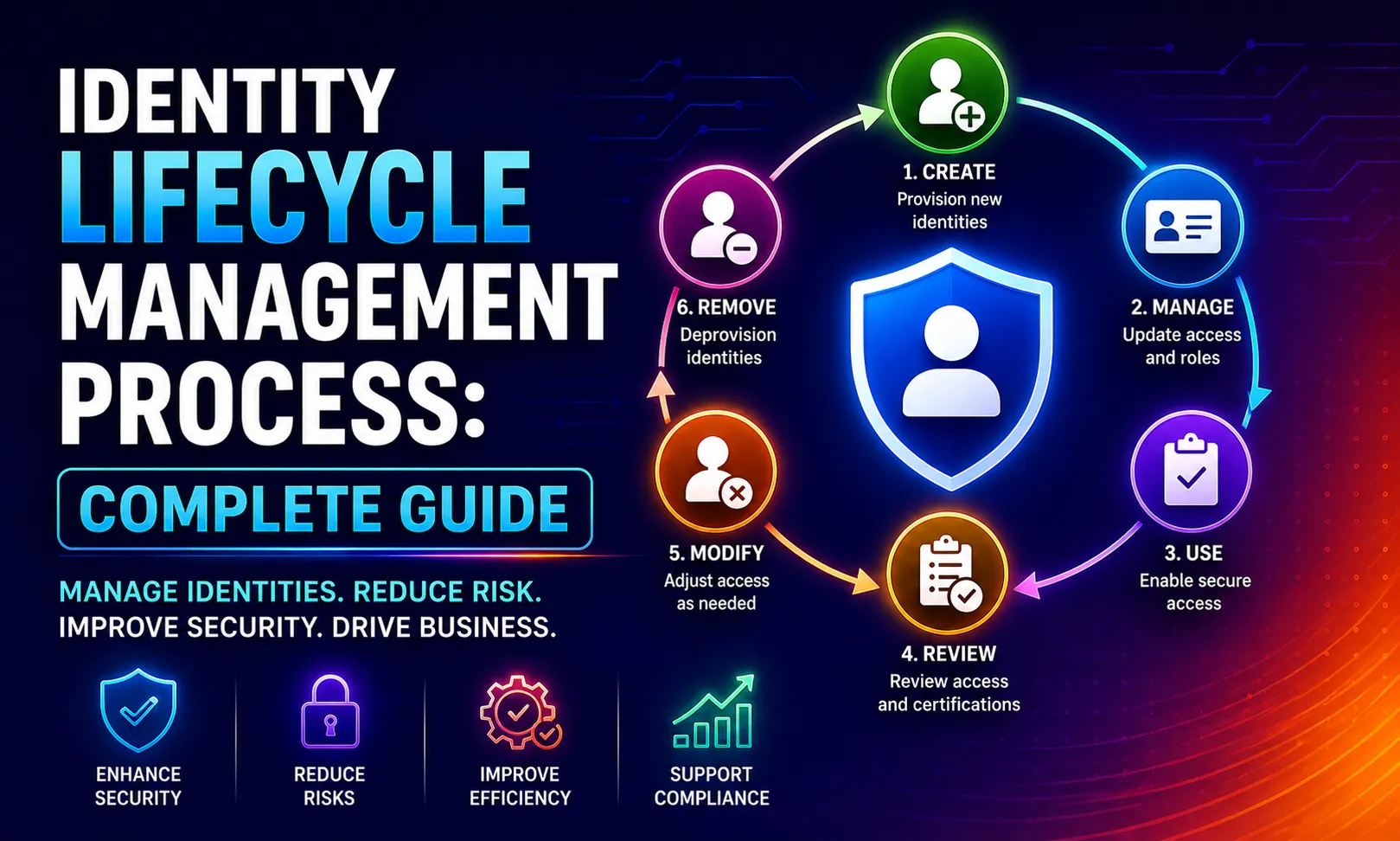
The identity lifecycle management process is the set of policies, workflows, and technical controls that govern a digital identity from the moment it is created – when a new employee joins, when a contractor is onboarded, when a system account is provisioned – through every change in role, access, or status, until the identity is fully deprovisioned when the person or system no longer needs access.
This guide explains the full process in plain terms, covers how Microsoft Entra ID enables modern automated lifecycle management, addresses the specific risks that poorly managed identity lifecycles create for Australian businesses, and provides the practical implementation guidance you need to build a programme that actually works.
We implement identity governance and access management solutions for Australian businesses across Sydney. The guidance in this article reflects what we see in real Microsoft 365 environments – the gaps that get organisations into trouble, and the controls that close them.
What Is Identity Lifecycle Management?
Identity lifecycle management (ILM) is the end-to-end process of managing a digital identity throughout its existence within an organisation. Gartner defines identity management as delivering the right access to the right people for the right applications at the right time and for the right reasons. The identity lifecycle takes that principle from creation to removal – what practitioners often call cradle to grave.
A digital identity is the representation of a real person, device, application, or automated service within your IT environment. For a person, this includes their user account, email address, group memberships, application access, licence assignments, and every permission attributed to them across every system they can reach.
The reason identity lifecycle management matters is not conceptual. It is practical. Every identity that exists in your environment but should not – every account that outlived its purpose, every permission that was never removed when a role changed, every service account whose owner left the company – is an open door. Attackers do not always break locks. Very often, they walk through doors that were left open.
Why identity lifecycle management is a business problem, not just an IT problem:
When a new employee cannot access the tools they need on day one, productivity is lost from the start. When a long-serving employee moves into a new role and quietly accumulates the permissions from every previous role over years – a pattern called privilege creep – they hold access that creates both a security risk and a compliance violation. When an employee leaves and their account is not immediately and completely deprovisioned, every day that account remains active is a day of unnecessary exposure. These are operational and financial consequences, not just technical ones.
The Joiner-Mover-Leaver Framework

The most widely used model for understanding the identity lifecycle is the Joiner-Mover-Leaver (JML) framework, which Microsoft formalises in its Entra ID Governance documentation. It describes three distinct lifecycle events that require managed identity responses.
Joiners: When a New Identity Enters Your Environment
A Joiner event occurs when someone – or something – enters your organisation and requires a digital identity. This is most commonly a new employee, but joiners also include contractors, temporary workers, partner users, external consultants, and new system accounts or service principals.
The Joiner process must answer several questions reliably and consistently every time it runs: What is this person’s authoritative identity record and where does it live? What access do they need based on their role, department, and location? What applications should they be provisioned to, and at what permission level? When should their access become active – and should any of it be time-limited?
In a manual process, this typically involves an IT service desk request, some email chains with a manager, and varying degrees of consistency depending on who handles the ticket. In a well-designed ILM programme, the new employee record created in your HR system (the authoritative source or Source of Truth) triggers an automated workflow that creates the identity in Microsoft Entra ID, assigns the correct licences and group memberships, provisions access to all required applications via SCIM, and sends the manager a Temporary Access Pass for the new employee’s device setup – all before their first day.
The difference in experience – for the employee, for IT, and for security – is significant. And the difference in risk is even more significant, because the automated process does not forget to assign the right access, and it does not accidentally assign the wrong access based on a misread email.
Movers: When an Identity’s Context Changes
A Mover event occurs when an existing identity changes in a way that should alter their access. Role promotions, departmental transfers, location changes, title changes, employment type changes from full-time to contractor – all of these are Mover events.
Mover events are where privilege creep is born. In environments without automated lifecycle management, when an employee moves from the operations team to the finance team, IT might add the finance team’s access. But the operations team’s access frequently stays. Six months later, when they move again, more access is added. After a few years, the employee holds permissions spanning three or four previous roles – none of which are appropriate to their current position.
The correct behaviour for a Mover event is: add the access appropriate to the new role, and remove the access that belonged to the previous role. Not one or the other. Both.
This sounds straightforward. In practice, it requires a clear authoritative record of what access each role is supposed to have, a reliable mechanism for detecting when a role change has occurred (which means your HR system must be integrated with your identity system), and an automated process for modifying access accordingly. Without these three components, Mover events are handled inconsistently, which means privilege creep is the reliable long-term outcome.
Leavers: When an Identity No Longer Belongs in Your Environment
A Leaver event occurs when a person’s relationship with the organisation ends – resignation, termination, retirement, end of contract, or death. For service accounts and system identities, a Leaver event occurs when the application, project, or integration the account was created for is decommissioned.
The Leaver process must be fast and complete. Fast, because every hour between the moment someone leaves and the moment their access is fully revoked is an hour of exposure – and the Australian cyber incident record contains multiple examples of damage done by former employees using still-active credentials in the days and weeks after departure. Complete, because partial deprovisioning – disabling the Entra ID account but leaving active sessions in SaaS tools that were not SCIM-integrated – is often as dangerous as no deprovisioning at all.
A well-designed Leaver workflow triggered by an HR termination event should: disable the account in Microsoft Entra ID immediately; revoke all active sessions across all connected applications; remove group memberships and application assignments; reassign or archive the departing employee’s OneDrive, email, and other data to their manager; disable or decommission any system accounts associated with the individual; and schedule permanent account deletion after the required retention period.
The distinction between disabling and deleting is important. Most organisations should disable rather than immediately delete – the account may be needed for audit purposes, to recover data, or if the termination is disputed. Microsoft recommends a 30-day soft-delete period before permanent removal, which allows recovery if needed while ensuring the account is inactive throughout.
The Source of Truth: Why Your HR System Is the Foundation
One of the most important and most misunderstood concepts in identity lifecycle management is the Source of Truth – the authoritative system that defines the definitive record of who a person is, what their role is, and what their current status within the organisation is.
In most organisations, this is the HR or Human Capital Management (HCM) system. Workday, SAP SuccessFactors, BambooHR, Employment Hero, and HRIS platforms of similar function are the systems where new employees are created, job changes are recorded, and terminations are processed. These systems hold the ground truth on identity attributes – department, job title, employment type, manager, cost centre, location, and employment start and end dates.
The critical point, which is consistently misunderstood in environments where this has not been explicitly addressed: Active Directory is not the source of truth for identity attributes. Microsoft Entra ID is not the source of truth for identity attributes. These are the identity stores that manage authentication and authorisation. They should be receiving and synchronising identity data from the HR system – not originating it.
When IT teams treat Active Directory or Entra ID as the master record for identity attributes, two problems emerge. First, when the HR system shows a termination, there is no automatic signal to the identity store to act on it. Second, when attributes are changed in the identity store (someone’s department is updated in Entra ID but not in the HR system), the two systems drift out of sync and there is no reliable authority to resolve the conflict.
A properly designed identity lifecycle management architecture establishes a clear, documented, and technically enforced hierarchy: the HR system is authoritative for identity attributes; Entra ID consumes those attributes to manage authentication and authorisation; downstream applications consume from Entra ID via SCIM or application-specific provisioning connectors. Data flows in one direction. Changes made outside the HR system are overwritten at the next sync cycle. There is no ambiguity about where the truth lives.
For organisations integrating Workday or SAP SuccessFactors with Microsoft Entra ID, Microsoft provides purpose-built inbound provisioning connectors that automate this synchronisation. For organisations using other HR platforms, Entra ID’s API-driven inbound provisioning and Logic Apps connectors provide the integration path.
Identity Governance vs. Identity Management: Understanding the Difference
These two terms are often used interchangeably, but they describe meaningfully different scopes of activity.
Identity Management covers the operational processes: creating accounts, provisioning access, handling role changes, disabling accounts. It is the execution layer – the day-to-day mechanics of ensuring the right people have access to the right systems.
Identity Governance covers the oversight and assurance layer: reviewing whether the access that exists is appropriate, certifying that permissions align with roles, auditing historical access events, and demonstrating to regulators and auditors that the access control environment is sound. Identity governance answers the question: do we have confidence that the access people have right now is the access they should have?
Both are necessary, and neither is sufficient without the other. An organisation that runs excellent provisioning processes but never reviews whether the access granted three years ago is still appropriate is quietly building up a privilege creep problem. An organisation that conducts rigorous access reviews but has no automated Leaver process is certifying access while leaving former employee accounts active.
Microsoft Entra ID Governance is the platform that combines both. It provides Lifecycle Workflows for automated Joiner-Mover-Leaver processes, Entitlement Management for defining and assigning access packages, and Access Reviews for periodic certification of existing access – all within a single managed environment. Understanding how these components work together is the starting point for implementing identity lifecycle management in a Microsoft 365 environment.
The Identity Vault and Application Integration Architecture
Beyond the HR source of truth and the identity store in Entra ID, a well-architected identity lifecycle environment includes a clear understanding of how identity data flows to target systems.
Each application that a user needs access to – Exchange Online, SharePoint, Salesforce, your HR self-service portal, your ERP system, your project management tool – is an entitlement. Provisioning a user to that application means creating their account in the application (or enabling their access if accounts are pre-created) with the appropriate permissions for their role.
SCIM (System for Cross-domain Identity Management) is the open standard that makes this automated. When a user is provisioned in Entra ID, SCIM-enabled applications automatically receive the instruction to create that user’s account with the correct role mapping. When the user is deprovisioned in Entra ID, SCIM instructs all connected applications to disable or remove that user’s account. This is the mechanism that makes the Leaver process fast and complete across every connected application simultaneously – rather than requiring a manual task in each system.
For applications that do not support SCIM, alternatives include application-specific provisioning connectors (available for many enterprise SaaS platforms through the Entra App Gallery), password-based SSO for legacy applications, and documented manual deprovisioning runbooks for applications where no automation is available. The manual runbooks are a last resort and must be actively maintained and tested – undocumented manual offboarding steps are the single most common source of orphaned accounts in real environments.
The practical architecture for most Australian Microsoft 365 environments looks like this:
HR system (Workday, BambooHR, Employment Hero, or similar) → Entra ID inbound provisioning connector → Microsoft Entra ID (user accounts, groups, licences) → SCIM provisioning to connected applications → Conditional Access governing all authentication to those applications.
Every link in this chain must be configured, tested, and monitored. A break at any point – the HR system failing to send a termination record, the SCIM connector not propagating a deprovisioning event – results in identity lifecycle failures that accumulate silently until they are discovered, usually during an incident or audit.
Non-Human Identities: The Overlooked Lifecycle
Most identity lifecycle management conversations focus on human users – employees and contractors. But modern IT environments contain an equal or greater number of non-human identities: service accounts, managed identities, application service principals, API keys, and automation accounts. These identities also have lifecycles, and their lifecycle management failures are some of the most significant security risks in enterprise environments.
Service accounts created for specific integrations or projects frequently outlive their purpose. The person who created them leaves. The project they served is decommissioned. No one knows what the account is for or whether it is safe to remove. It sits in Active Directory with elevated permissions, no assigned owner, and no review date – a perfect target for lateral movement if an attacker obtains the credentials.
The lifecycle management principles for non-human identities are the same as for human ones, but the implementation differs in important ways. Non-human identities should always use managed identities or service principals rather than user accounts where possible – this eliminates the credential management problem entirely, as the identity is authenticated by the platform rather than by a stored secret. Where credential-based service accounts are unavoidable, credentials should be rotated on a defined schedule, access should be scoped to the minimum required, and an owner should be assigned and documented for each account.
Microsoft Entra now supports Conditional Access policies targeting workload identities – meaning the same policy-based access controls that govern your human users can be applied to your service principals and application identities. This is an important advance that many organisations have not yet implemented, leaving workload identities as ungoverned exceptions in an otherwise well-controlled environment.
Guest and External Identity Lifecycle Management
Australian businesses increasingly work with contractors, partners, clients, and vendors who need access to internal systems – Microsoft Teams channels, SharePoint sites, specific applications – for limited periods and limited purposes. These external identities have lifecycles too, and they are frequently the least well-managed identities in the environment.
Microsoft Entra External ID (formerly Azure AD B2B) allows external users to be invited to collaborate in your tenant using their own identity credentials. The lifecycle management challenge for external identities is that there is rarely an HR system that records when an external collaboration relationship ends. A contractor finishes their engagement and moves on, but their guest account in your tenant may remain active indefinitely with no one explicitly managing its removal.
The controls for external identity lifecycle management include: setting an expiry policy on guest accounts (Entra ID allows you to configure automatic expiry after a defined period of inactivity); configuring Access Reviews specifically for external users, run quarterly, where a named reviewer certifies that each guest account still requires access; and using Entitlement Management access packages with defined time-limited validity periods for external user access, so access automatically expires rather than persisting indefinitely.
For Australian businesses subject to Privacy Act obligations, the management of external identities who have access to systems containing personal information is a direct compliance consideration – every active guest account that has unnecessary access to personal data is a potential data breach waiting to be reported to the OAIC.
Privileged Identity Management: The High-Stakes Lifecycle
Privileged accounts – those holding administrative roles in Entra ID, Azure, Microsoft 365 services, or other high-value systems – require a more intensive lifecycle management approach than standard user accounts. The compromise of a single privileged account can be catastrophic: an attacker with Global Administrator access can disable security controls, exfiltrate all data, and lock out the legitimate IT team simultaneously.
Microsoft Entra Privileged Identity Management (PIM) addresses the lifecycle of privileged access through a model called just-in-time (JIT) access. Rather than assigning administrative roles permanently – which leaves an administrator with Global Admin rights at all times, whether they are currently performing administrative tasks or not – PIM makes privileged roles eligible rather than active. When an administrator needs to perform a privileged task, they activate their eligible role for a defined time period (one hour, four hours, eight hours), with optional justification and approval requirements, and with full audit logging of every activation.
When the time period expires, the role assignment reverts to eligible status. The administrator’s account holds no active privileged role outside of those specific activation windows. The attack surface for credential theft targeting that account is dramatically reduced.
PIM also enforces the periodic review of privileged role eligibility – a process called access review or attestation for privileged roles. Every active and eligible role assignment should be reviewed quarterly by a named approver who can confirm whether the role is still appropriate. This prevents privileged access from accumulating silently over time as people change roles or responsibilities.
For Australian businesses targeting Essential Eight Maturity Level 2 or above, the requirement to restrict administrative privileges directly aligns with PIM’s just-in-time model. Permanent, always-active administrative accounts are incompatible with Maturity Level 2 compliance. Learn more about how this fits within the broader framework in our Essential Eight checklist.
Access Reviews: Ongoing Governance After Provisioning
Even the most automated and well-designed provisioning process will, over time, produce access that is no longer appropriate. Roles change in ways the automation did not anticipate. Exceptions were made during onboarding and never revisited. A project team was given temporary access that was never explicitly removed because no one set an end date.
Access reviews – also called access certifications or attestation – are the periodic process of reviewing existing access assignments and confirming or removing them. Microsoft Entra ID Access Reviews allows you to configure automated review cycles for group memberships, application assignments, privileged roles, and external user access.
A well-designed access review programme should run quarterly for privileged roles, semi-annually for high-sensitivity application access, and annually for general application and group memberships. Reviews should be assigned to the appropriate reviewer – typically the resource owner or the manager of the users in scope – not to the IT team. The person who understands whether a sales executive still needs access to the finance reporting application is their manager, not the IT administrator.
When a reviewer fails to respond to an access review, the access should automatically expire – this is the configuration Entra ID supports and it should be the default. Allowing access to persist through reviewer inaction is the opposite of a governance programme.
Access reviews also provide the audit evidence that compliance frameworks require. A documented, regularly completed access review programme is one of the most important pieces of evidence an organisation can produce during a compliance audit or following a data breach investigation. It demonstrates that access was not just provisioned – it was periodically reviewed and confirmed as appropriate.
Implementing Identity Lifecycle Management in Microsoft 365: Step by Step
This is the practical implementation path we follow when building an identity lifecycle management programme for Australian clients running Microsoft 365.
Step one: Establish your authoritative source. Identify your HR or HCM system and confirm it contains the identity attributes needed to drive automated provisioning: employee start date, end date, job title, department, manager, location, and employment type. If your HR system lacks some of these fields or populates them inconsistently, clean the data before building automation on top of it. Automation built on unreliable data produces unreliable identity management.
Step two: Configure inbound provisioning from HR to Entra ID. Connect your HR system to Microsoft Entra ID using the appropriate inbound provisioning connector – Workday, SAP SuccessFactors, or API-driven inbound provisioning for other platforms. Configure attribute mappings so that changes in the HR system flow through to Entra ID automatically. Test with a sample of real records before enabling production synchronisation.
Step three: Configure Lifecycle Workflows for Joiner, Mover, and Leaver events. Microsoft Entra ID Governance Lifecycle Workflows allow you to define automated task sequences triggered by identity lifecycle events. A Joiner workflow triggered when a new user’s start date is two days away can: generate a Temporary Access Pass and email it to the manager, add the user to the appropriate onboarding groups, assign the required licences, and send a welcome email. A Leaver workflow triggered on the employee’s end date can: disable the account, revoke all active sessions, remove group memberships, notify the manager, and schedule account deletion after the retention period. Building these workflows requires Microsoft Entra ID Governance licensing.
Step four: Configure SCIM provisioning to all connected applications. Enable SCIM provisioning for every SaaS application in the Entra App Gallery that supports it. For each integration, configure attribute mapping to ensure users are created with the correct roles and that deprovisioning events propagate correctly. For applications without SCIM support, document the manual deprovisioning steps in a structured runbook and assign ownership.
Step five: Configure Conditional Access policies to govern all authentication. Identity lifecycle management and Conditional Access are complementary. A well-managed identity with an active account but no Conditional Access policies governing their authentication is only half-protected. Our detailed conditional access policy examples guide covers the specific policies that should accompany an identity lifecycle programme.
Step six: Enable Privileged Identity Management for all administrative roles. Convert all permanent privileged role assignments to eligible assignments in Entra PIM. Configure activation requirements, time limits, and approval workflows appropriate to each role’s sensitivity. Enable PIM access reviews on a quarterly schedule.
Step seven: Configure external identity lifecycle controls. Set guest account expiry policies, configure quarterly Access Reviews for all external users, and migrate external collaboration to time-limited Entitlement Management access packages where the access relationship has a defined end date.
Step eight: Establish ongoing access review cadences. Configure Access Reviews for privileged roles (quarterly), high-sensitivity application access (semi-annual), and general group memberships (annual). Assign reviews to resource owners and managers, not to IT. Configure automatic access removal on reviewer non-response.
Step nine: Monitor and alert on identity anomalies. Configure alerts for: accounts that have been inactive for more than 30 days but remain active; accounts with privileged roles that have not been reviewed in more than 90 days; SCIM provisioning failures that may indicate deprovisioning events not completing; HR-to-Entra synchronisation errors. Identity lifecycle management is not a set-and-forget process – it requires ongoing monitoring to catch failures before they become incidents.
Common Identity Lifecycle Management Failures and How to Avoid Them
These are the failure patterns we encounter most frequently when assessing Australian businesses’ identity environments.
No connection between HR and IT. The HR system and the identity store operate independently. Joiners are handled by email requests to IT. Leavers are handled by a manager calling the help desk. Movers are handled when the employee themselves notices they do not have access to something in their new role. This is the starting point for most organisations and the highest-risk configuration. The fix is establishing the HR-to-Entra integration described above.
Treating the first provisioned access as permanent. Access assigned on day one based on role is never revisited. The employee changes roles twice over five years, accumulating permissions each time. By year five they hold access appropriate to three different roles, none of which is their current position. The fix is structured Mover workflows that explicitly remove previous-role access and structured access reviews that catch privilege creep between workflow events.
No dedicated deprovisioning process for contractors. Employees have offboarding processes. Contractors frequently do not. Their access ends when the engagement ends, but no one explicitly triggers a deprovisioning workflow because they were never in the HR system. Maintain a separate register for contractor identities with defined access end dates, and assign an owner responsible for triggering deprovisioning when the engagement concludes.
Overlooking service accounts in offboarding. When an employee who owned or managed a service account leaves, the account becomes ownerless. It remains active, often with elevated permissions, with no one responsible for reviewing or decommissioning it. Every service account should have a named owner in your identity governance system, and that ownership should be reviewed as part of the Leaver process for any departing employee.
Relying on manual deprovisioning for SaaS tools. Manual offboarding checklists fail. They are forgotten during busy periods, they are incomplete when the person running them is not familiar with all the tools the departing employee used, and they leave no audit trail. Every SaaS application that is not SCIM-connected to Entra ID is a gap in your deprovisioning coverage. Prioritise SCIM integration for all business-critical applications as part of your identity lifecycle programme.
Not testing the Leaver process. Most organisations configure a deprovisioning process once and assume it works. Deprovisioning processes should be tested at least quarterly – using test accounts if necessary – to confirm that every connected application correctly receives and processes the deprovisioning event. SCIM connectors fail silently in ways that are only discovered when a former employee’s account is found active during an audit.
A Real-World Example: Identity Lifecycle Management for a Growing Sydney Professional Services Firm
One of CodeHyper’s clients, a professional services firm in Sydney that had grown from 30 to 90 staff over three years, engaged us after a cyber insurance renewal assessment flagged identity governance as a material gap. Their specific concerns were: former employee accounts they were not certain had been fully deprovisioned, inconsistent access for staff who had moved between practice areas, and no visibility into what external consultants could still access.
The assessment confirmed their concerns. We found eleven accounts belonging to former employees that remained active in Entra ID. Of those, seven had active application assignments in at least one SaaS tool because the manual offboarding checklist used by the HR team did not include that application. Three of the seven had signed in to those applications within 90 days of our assessment.
We also found 23 staff members who held access to at least two practice area SharePoint environments despite only working in one, a direct result of access being added when they joined or moved teams but never removed when they moved on.
The remediation programme ran over six weeks. We connected their HR platform (Employment Hero) to Entra ID using API-driven inbound provisioning, configured Lifecycle Workflows for Joiner and Leaver events, enabled SCIM provisioning for the six SaaS applications that supported it, and created manual runbooks for the remaining two that did not. We configured Entra PIM for the three administrative accounts in the environment and set up quarterly Access Reviews for privileged roles and external users.
All eleven former employee accounts were deprovisioned and scheduled for deletion. The 23 privilege creep accounts were reviewed with their managers and reduced to appropriate access.
At the time of the cyber insurance renewal six months later, the identity governance gap was cleared. The insurer noted the improvements in their assessment summary.
If your organisation is in a similar position, contact our team for a no-obligation identity governance assessment.
Identity Lifecycle Management and Australian Compliance
Robust identity lifecycle management is not just security best practice for Australian businesses – it is increasingly a compliance obligation.
ACSC Essential Eight – Restrict Administrative Privileges. The Essential Eight requires that administrative accounts be used only for administrative tasks, that the number of privileged accounts be minimised, and that privileged access be reviewed regularly. These requirements map directly to PIM-based just-in-time access and quarterly privileged role access reviews. Identity lifecycle management is the operational mechanism through which this control is maintained over time – not just configured once and forgotten.
Privacy Act 1988 (Cth) and the Notifiable Data Breaches Scheme. The Privacy Act requires organisations to take reasonable steps to protect personal information. A former employee’s active account with access to systems containing customer personal data – one of the most common identity lifecycle failures – is a clear failure of this obligation. The OAIC’s data shows that compromised credentials were the leading cause of notifiable data breaches in the second half of 2024. Identity lifecycle management that ensures timely and complete deprovisioning is a direct Privacy Act control. The 2022 Privacy Amendment strengthened enforcement significantly, including the introduction of a statutory tort for serious privacy invasions from 2025.
The Cyber Security Act 2024. Australia’s Cyber Security Act 2024, which came into force in November 2024, introduces mandatory ransomware payment reporting and strengthened obligations for critical infrastructure. For businesses in scope, demonstrating mature identity governance practices – including documented lifecycle management processes – supports the broader security posture obligations under the Act.
ISO 27001 Annex A.9 – Access Control. The ISO 27001 access control domain requires that access rights be granted on the basis of business need, reviewed regularly, and removed promptly when no longer needed. Each of these requirements corresponds directly to the Joiner-Mover-Leaver framework and access review processes described in this guide.
SOC 2 Type II – CC6 Logical and Physical Access. SOC 2 access control criteria require evidence of user provisioning and deprovisioning processes, access reviews, and privileged account management. An automated, documented, and tested identity lifecycle management programme provides the evidence base required for SOC 2 Type II audit.
For organisations managing their Entra ID environment as part of a broader Microsoft 365 security posture, our related guides on Microsoft Entra ID and Microsoft 365 security provide complementary coverage. For the identity access controls required under the Essential Eight specifically, our Entra ID Protection guide and conditional access policy examples are the direct implementation references.
Identity Lifecycle Management Checklist
Use this to assess the maturity of your current identity lifecycle programme and identify gaps.
Foundations:
- Authoritative HR source of truth identified and documented
- HR system connected to identity store with automated synchronisation active
- Attribute mapping between HR and Entra ID configured and tested
- Break-glass accounts created and excluded from lifecycle automation
Joiner process:
- New employee accounts created automatically from HR system data, not manual requests
- Access provisioned based on role and department, not individually negotiated
- Licences assigned automatically based on role
- Onboarding notifications sent to manager and new employee automatically
- Access active from day one – not day three after help desk ticket resolution
Mover process:
- Mover events detected from HR system attribute changes, not reported manually
- Previous-role access explicitly removed as part of Mover workflow
- New-role access added as part of Mover workflow
- Group memberships and application assignments updated automatically
Leaver process:
- Leaver event triggered immediately from HR termination record – not from manager notification
- Account disabled within minutes of leaver event, not hours or days
- All active sessions revoked simultaneously across all connected applications
- SCIM deprovisioning propagated to all connected SaaS applications
- Manual deprovisioning runbooks exist and are tested for non-SCIM applications
- Manager notified automatically with data transfer instructions
- Account scheduled for permanent deletion after defined retention period
Privileged access:
- Entra PIM enabled for all administrative roles
- All privileged role assignments are eligible (JIT) not permanent
- PIM activation requirements and time limits configured
- Quarterly privileged role access reviews scheduled and assigned
Ongoing governance:
- Quarterly access reviews for privileged roles
- Semi-annual access reviews for high-sensitivity application access
- Annual access reviews for general group memberships and application assignments
- Guest account expiry policy configured
- Quarterly access reviews for all external/guest identities
- Service account ownership documented for all non-human identities
- Monthly review of inactive account report
Monitoring:
- Alert configured for accounts inactive for 30+ days remaining active
- Alert configured for SCIM provisioning failures
- Alert configured for HR-to-Entra synchronisation errors
- Alert configured for privileged role activations outside business hours
- Deprovisioning process tested quarterly with test accounts
Frequently Asked Questions
What is identity lifecycle management?
Identity lifecycle management is the set of processes, policies, and technical controls that govern a digital identity from creation to removal. It covers the full journey: creating an identity when a new employee joins, updating access when their role changes, and fully revoking access when they leave. It also applies to non-human identities such as service accounts, application service principals, and system integrations. The goal is ensuring that every identity in an environment has exactly the access it needs – no more – and that access is kept accurate throughout the identity’s lifetime.
What is the Joiner-Mover-Leaver framework?
The Joiner-Mover-Leaver (JML) framework is the standard model for understanding the three lifecycle events that require managed identity responses. A Joiner event occurs when a new person or system enters the organisation and needs a digital identity created. A Mover event occurs when an existing identity changes in a way that should alter their access – a role change, department transfer, or promotion. A Leaver event occurs when a person or system leaves and their access must be fully revoked. Microsoft formalises this framework in its Entra ID Governance Lifecycle Workflows feature.
What is the source of truth in identity lifecycle management?
The source of truth (also called the authoritative source) is the system that holds the definitive record of who a person is and what their current status and role are. In most organisations, this is the HR or Human Capital Management system – Workday, SAP SuccessFactors, Employment Hero, BambooHR, or similar platforms. Active Directory and Microsoft Entra ID are identity stores that manage authentication and authorisation – they should consume identity data from the HR source of truth, not originate it. When the HR system is not connected to the identity store, lifecycle events are handled manually and inconsistently.
What are orphaned accounts and why are they dangerous?
Orphaned accounts are user accounts that remain active in an identity store or connected application after the person or purpose they were created for no longer exists. Common examples include accounts belonging to former employees that were not fully deprovisioned, service accounts created for projects that have been decommissioned, and external user accounts where the collaboration relationship has ended. Orphaned accounts are dangerous because they represent access that should not exist – and attackers actively look for them. The Australian OAIC’s data breach notifications consistently show compromised credentials as the leading attack vector, and orphaned accounts are a reliable source of exploitable credentials.
What is privilege creep and how does identity lifecycle management prevent it?
Privilege creep is the gradual accumulation of access permissions over time that results from access being consistently added when roles change but rarely removed. An employee who has moved through multiple roles over several years may hold permissions spanning all of those previous positions, far exceeding what their current role requires. Identity lifecycle management prevents privilege creep through two mechanisms: automated Mover workflows that explicitly remove previous-role access when a role change occurs, and periodic access reviews that identify and remove accumulated permissions that have not been caught by automation.
What licence do I need for Microsoft Entra ID Lifecycle Workflows?
Microsoft Entra ID Governance Lifecycle Workflows require the Microsoft Entra ID Governance licence, which is available as a standalone add-on or as part of the Microsoft Entra Suite. This is separate from the standard Entra ID P1 and P2 licences. Entra ID P1 (included in Microsoft 365 Business Premium) supports user provisioning, SCIM integration, and Conditional Access but does not include Lifecycle Workflows. Entra ID P2 adds Privileged Identity Management and Access Reviews. Lifecycle Workflows specifically require the Entra ID Governance SKU. For most Australian SMBs, a pragmatic approach is to implement the P1/P2 controls first and add Entra ID Governance when the volume of lifecycle events justifies the automation investment.
How does identity lifecycle management support Essential Eight compliance?
The Essential Eight Restrict Administrative Privileges control requires that administrative accounts be used only for administrative tasks, that the number of privileged accounts be minimised, and that privileged access be reviewed regularly. These requirements are directly addressed by Privileged Identity Management (just-in-time access), structured Leaver processes that include privileged account deprovisioning, and quarterly access reviews for privileged roles. The Multi-Factor Authentication control, which requires MFA for all users, is enforced more reliably when combined with a managed identity lifecycle – because accounts are only active when they should be, and Conditional Access policies apply MFA consistently to all active identities.
How quickly should an account be deprovisioned when someone leaves?
Immediately. The account should be disabled within minutes of the termination event being recorded in the HR system, and all active sessions should be revoked simultaneously. The common practice of disabling accounts at the end of business on the last day of employment – or relying on a manager calling the help desk – creates unnecessary exposure. In Australian cyber incidents involving former employees, access was used in the hours and days after termination, not weeks later. Automated Leaver workflows triggered by HR termination records are the only reliable way to ensure immediate deprovisioning. Permanent deletion should follow after a defined retention period, typically 30 days.
What is the difference between deprovisioning and deleting an account?
Deprovisioning means disabling the account and revoking all access – the account still exists in the identity store but cannot be used to authenticate. Deleting means permanently removing the account and all associated data. The distinction matters because a deprovisioned account can be reactivated if the termination was incorrect, if the person returns as a contractor, or if data needs to be recovered from their mailbox or OneDrive. Most organisations should deprovision immediately and schedule deletion after a defined retention period – Microsoft recommends 30 days before permanent removal from Entra ID. Once deleted, the account and associated data cannot be recovered without backup systems.